
Many people pay for high-speed internet plans but do not receive the speeds promised by their providers. This investigation looks at the specific points where data slows down within a house. When a network fails to perform, the cause is often a "bottleneck"—a single part of the system that limits the flow of data. While many blame their Internet Service Provider (ISP), evidence suggests that internal hardware and user habits are frequently responsible. Identifying whether the issue is a physical cable, an old setting, or a background app is the first step in resolving these disruptions.
The Infrastructure of Local Connectivity
The timeline of available data (2024–2026) shows a consistent gap between modern internet plans and older home hardware. As ISPs move toward gigabit speeds, many home systems rely on equipment built for much slower eras.
Read More: Chrome mimeHandler API lets extensions handle file types

Legacy Hardware: Users often keep devices like routers and switches for many years. An old "10/100" switch limits every device connected to it to 100 Mbps, even if the ISP provides 1,000 Mbps.
Physical Obstacles: Signal strength is affected by the placement of the router. Placing it in a central location is suggested to maintain a clear "sphere" of coverage.
Internal Wiring: In some documented cases, users with "Gigablast" plans (940 Mbps) reported speeds as low as 1 Mbps. Direct testing (plugging a laptop straight into the modem) is often used to see if the house wiring is the cause.
"If you have a 300Mb/s ISP connection, you simply cannot saturate your internal connection… However, if you’re still running your homelab at gigabit, it’s time to upgrade." — How-To Geek
Evidence of Network Limitations
Data from various technical reports indicates that bottlenecks are rarely the result of a single failure. Instead, they are the result of a mismatch between service levels and hardware capacity.
| Bottleneck Type | Common Cause | Evidence/Signal |
|---|---|---|
| Physical Port | VoIP Phone pass-throughs | PC speed is lower than the router's output when connected through a desk phone. |
| Data Saturation | Background backups | High bandwidth use during sleep hours for cloud photos and videos. |
| Protocol Limits | Outdated Wi-Fi standards | Wi-Fi 5 or older routers cannot handle the throughput of Wi-Fi 7 or modern fiber lines. |
| ISP Intervention | Throttling | Speed drops significantly during "peak hours" (evenings). |
The primary signal of a bottleneck is a high-speed signal entering the home (modem) but a low-speed signal reaching the end device (PC/Phone).
1. The Impact of Hidden Hardware Ports
A significant but often overlooked bottleneck occurs in office-at-home setups involving Voice over IP (VoIP) phones. These phones often sit between the wall jack and the computer. If the phone’s "pass-through" port is only rated for 100 Mbps, the computer will never exceed that speed, regardless of the ISP plan. Is it possible that the hardware meant to help us communicate is the very thing slowing our data?
2. Digital Consumption vs. Bandwidth Capacity
"Bandwidth saturation" occurs when the number of active tasks exceeds the network's total capacity.
Read More: Nations Championship rugby starts 7 April 2026 with new point system
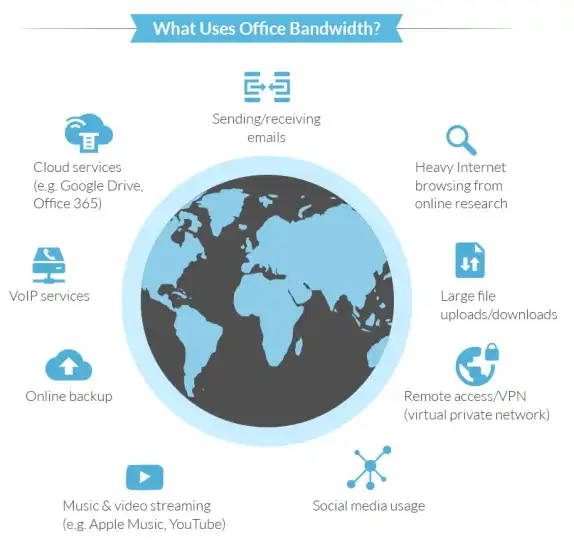
Simultaneous Usage: Running six browser windows, streaming music, uploading to social media, and watching 4K video at once.
Hidden Tasks: 4K streaming requires approximately 15–25 Mbps. If multiple devices perform these tasks, the "road" to the house becomes crowded.
Automatic Backups: Devices often upload large files (photos/videos) to the cloud automatically, which can "quietly eat up bandwidth."
3. Internal Settings and Firmware
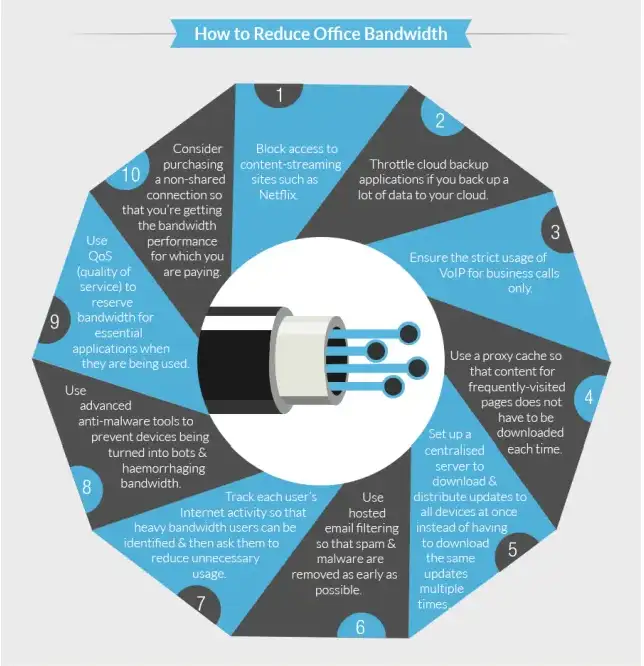
Even modern routers can be slowed by poor configuration. Experts suggest that "power users" should investigate router firmware.
Guest Networks: Failing to use VLANs or Guest Wi-Fi can lead to security and speed issues if many devices share one channel.
Outdated Firmware: Software that runs the router may need updates to handle new data transfer technology.
Quality of Service (QoS): Without policies to manage resources, one device (like a gaming console) can take all available bandwidth from others.
4. The Role of the Internet Service Provider (ISP)
While home hardware is often at fault, the ISP is not always innocent.
Throttling: Some providers intentionally slow down connections if they detect high usage or during busy times of the day.
Service Discrepancy: A plan might be advertised at 500 Mbps, but the actual delivery to the modem may be lower. Could the inconsistency in Speedtest results be a sign of provider-side congestion rather than home equipment failure?
Expert Analysis
Analysis from technical sources like ZDNet and XDA-Developers suggests a methodical approach to identifying these issues. Experts agree that "you must physically test one piece at a time." This involves bypassing the router and connecting a single laptop to the modem to establish a baseline speed.
Vanderbilt University technical notes emphasize the physical environment, noting that interference from other electronic devices can disrupt wireless signals. Silicon Plains and Alltek Services both point to the "firewall" or "pass-through ports" as the most common non-technical traps for users.
"Your internet connection type plays a huge factor in your overall speeds. Think of your internet connection as a road directly to your house." — HighSpeedInternet.com
Conclusion and Findings
The investigation finds that network slowdowns are rarely caused by a single "broken" part but are instead the result of technical mismatches.
Read More: BEREC Asks for Mobile Network API Ideas from Developers
Primary Finding: Legacy hardware, specifically 10/100 switches and VoIP pass-through ports, are the most frequent "hidden" bottlenecks in modern homes.
Secondary Finding: Consumer behavior—such as running multiple high-definition streams and background cloud backups—often exceeds the purchased bandwidth limit.
Verification Requirement: Speed tests must be conducted at various points in the network (Modem vs. Router vs. Wi-Fi) to accurately find the choke point.
Next Steps for Users:
Perform a direct-to-modem speed test to verify ISP delivery.
Inspect all physical cables and switches for "10/100" labels.
Check router settings for firmware updates and device priority.
Monitor for "bandwidth hogs" using router management apps.
Reference Sources
How-To Geek: 5 hidden bottlenecks killing network speed
PingPlotter: Find the device slowing down your network
ZDNet: 10 ways to fix slow Wi-Fi
XDA-Developers: What actually bottlenecks modern networks
HighSpeedInternet: 8 reasons for slow internet
Dobson Fiber: Meet the bandwidth hogs
Superfast IT: Common causes of slow internet
Alltek Services: Non-technical tips for bottlenecks