A small, low-cost device, the Raspberry Pi, now offers straightforward remote access to its desktop environment from virtually anywhere. This ease of access contrasts sharply with the perceived complexities and limitations often encountered when attempting similar remote connections for Windows systems. The findings suggest a significant gap in user-friendliness and accessibility for remote Windows control, despite its widespread use.
Understanding the Remote Access Landscape
Remote access allows users to control a computer from another location. For the Raspberry Pi, this means interacting with its desktop or command line as if physically present. Several methods have been documented, each with its own setup requirements and capabilities.
Local Network Access: Connecting to a Raspberry Pi from another device on the same home network is generally achieved by using the Pi's local IP address with remote desktop client software.
Remote Network Access: To connect from outside the home network, a more involved setup is typically necessary. This often includes configuring the home router to forward specific ports and knowing the router's public IP address.
Dedicated Services: Some solutions, like Raspberry Pi Connect, aim to simplify this process, potentially by providing a managed service for remote access.
VPN Solutions: For enhanced security and broader access, Virtual Private Networks (VPNs) such as PiVPN (using WireGuard or OpenVPN) are recommended for creating a secure tunnel into a home network, making remote devices appear as if they are on the local network.
Methods for Raspberry Pi Remote Access
Multiple approaches have been explored to enable remote control of a Raspberry Pi from a Windows computer:
Remote Desktop Protocol (RDP) via Xrdp:
Installing the
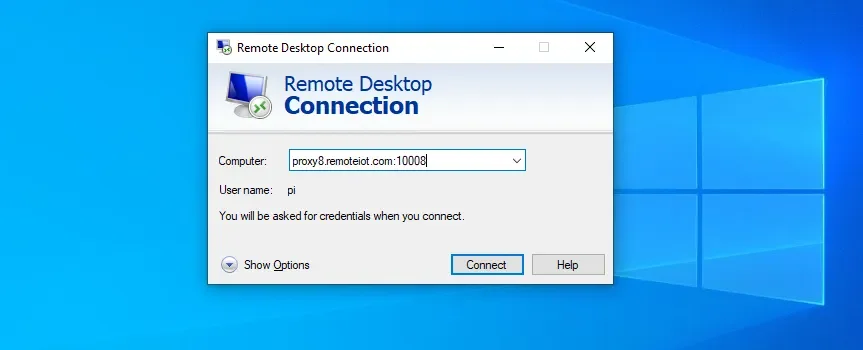
xrdppackage on the Raspberry Pi allows it to act as an RDP server.Windows' built-in Remote Desktop Connection client can then be used to connect to the Pi's IP address.
This method is functional for controlling the Pi's desktop remotely.
Virtual Network Computing (VNC):
VNC is another common protocol for remote desktop sharing.
Setting up a VNC server on the Raspberry Pi and using a VNC Viewer on Windows can provide remote access.
Some users have encountered difficulties with VNC, particularly regarding outdated instructions or compatibility issues.
Raspberry Pi Connect:
This service is presented as a simpler method for achieving remote access.
It requires a Raspberry Pi ID and allows for remote interaction through its interface.
VPNs for Network Access:
Tools like PiVPN are employed to create secure VPN connections into the home network.
Once connected via VPN, devices can access the Raspberry Pi as if they were on the local network, bypassing some direct internet exposure.
Challenges in Windows Remote Access
While the Raspberry Pi's remote access appears relatively streamlined, achieving similar ease of use for Windows systems is not as consistently documented or presented.
Read More: Chrome mimeHandler API lets extensions handle file types
Complexity of Setup: Setting up remote access for Windows from an external network can involve advanced router configurations, such as port forwarding.
Varied Software Compatibility: Some users have reported issues with VNC and SSH when attempting to connect from Windows to a Raspberry Pi, suggesting that out-of-date guides or underlying technical hurdles may exist.
Network Limitations: Certain remote access tools, like Xrdp and Xming, are noted to function primarily within the same local network, necessitating additional steps like VPNs for external access.
User Experiences and Observations
Discussions on forums reveal a user drive towards simple, cross-platform solutions for remote access.
"I am trying to set up Remote Desktop on my Windows machine to access the RPi desktop." - Raspberry Pi Forums user.
"My desktop and laptop are windows out of convince and I need a solution that I can carry out on them. So far I have tried various methods online such as VNC and SSH and none of them have worked correctly due to either out of date instructions, no windows instructions or some other problem crops up." - SuperUser.com user.
These comments suggest a persistent need for clear, up-to-date instructions and robust solutions that cater to users with Windows as their primary operating system.
Technical Underpinnings of Remote Control
The core technologies enabling remote access involve network protocols and server/client software configurations.
RDP: Microsoft's Remote Desktop Protocol is a proprietary protocol developed by Microsoft that provides a user with a graphical interface to connect to another computer over a network connection.
xrdpacts as an open-source implementation on Linux-based systems like Raspberry Pi OS.VNC: Virtual Network Computing is a graphical desktop-sharing system that uses the RFB protocol to remotely control a computer. It transmits keyboard input and mouse movements from one computer to another.
VPNs: Virtual Private Networks create encrypted tunnels over public networks, allowing devices to communicate securely and privately. This is crucial for accessing resources on a private network from a remote location.
Summary of Findings
The current landscape indicates that the Raspberry Pi, through various community-driven methods and dedicated services, offers a readily accessible remote desktop experience for users. This is often achieved by installing specific server software (like xrdp or VNC servers) on the Pi and using compatible client applications on Windows. For access beyond a local network, techniques like port forwarding or the implementation of VPNs are commonly employed.
While Windows possesses its own remote desktop capabilities, the process of setting up and consistently accessing other machines remotely, especially when interacting with simpler devices like the Raspberry Pi, appears to be a more complex undertaking for many users, based on forum discussions and technical guides. The effectiveness and ease of use of these solutions can vary significantly depending on the specific software versions, network configurations, and the user's technical proficiency.
Read More: CPU GPU Bottleneck Today: How to Check Your PC's Slowdowns
Sources
Circuit Basics: How to Access the Raspberry Pi Desktop with a Remote Desktop Connection (November 11, 2024) - https://www.circuitbasics.com/access-raspberry-pi-desktop-remote-connection/
Raspberry Tips: 5 Ways to Remote Desktop on Raspberry Pi (Windows/Linux/Mac) (September 18, 2025) - https://raspberrytips.com/remote-desktop-raspberry-pi/
DroneBot Workshop: Raspberry Pi Remote Access - 3 Methods (July 14, 2024) - https://dronebotworkshop.com/pi-remote-access/
Raspberry Pi Forums: Access my home network remotely (Brave) - https://forums.raspberrypi.com/viewtopic.php?t=279448
Random Nerd Tutorials: Raspberry Pi: Set Up Remote Desktop Connection (RDP) - Windows PC (February 7, 2024) - https://randomnerdtutorials.com/raspberry-pi-remote-desktop-connection-rdp-windows/
Super User: How to remote-desktop RaspberryPi on windows device via ethernet without router (Brave) - https://superuser.com/questions/1258680/how-to-remote-desktop-raspberrypi-on-windows-device-via-ethernet-without-router
MakeUseOf: How to Remote Connect to a Windows PC From a Raspberry Pi (December 12, 2019) - https://www.makeuseof.com/tag/remote-connect-windows-pc-raspberry-pi/
Raspberry Pi Forums: Remote Access to RPi Desktop from Windows (Brave) - https://forums.raspberrypi.com/viewtopic.php?t=361123
remoteiot.com: How to Remotely Access Raspberry Pi Remote Desktop (Brave) - https://remoteiot.com/how-to-remote-access-raspberryp-pi-remote-desktop.html
Super User: How to access my Raspberry Pi remotely? (Brave) - https://superuser.com/questions/1298302/how-to-access-my-raspberry-pi-remotely