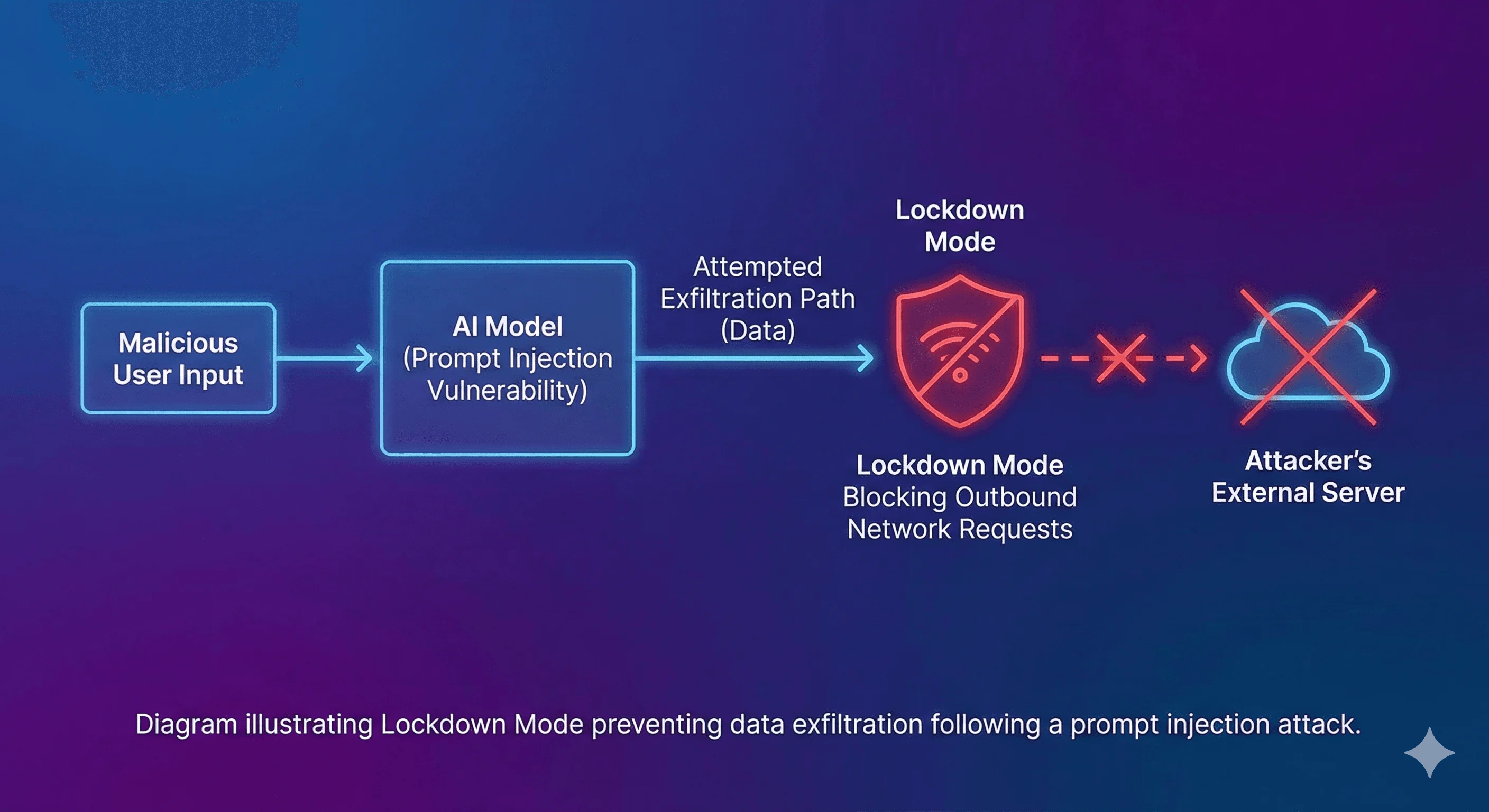
OpenAI has launched a new "Lockdown Mode" for ChatGPT, a security feature designed to mitigate risks associated with prompt injection attacks. This mode places stricter controls on how the AI interacts with external systems and limits certain functionalities. The move comes as generative AI tools become more integrated into enterprise environments, raising concerns about data security and the potential for malicious actors to exploit vulnerabilities.

Context: The Rise of Prompt Injection and OpenAI's Response
Prompt injection is a type of cyberattack where malicious text is crafted to trick an AI model into ignoring its original instructions and performing unintended actions. This can lead to sensitive data being exposed or systems being compromised. Historically, this has been compared to SQL injection attacks prevalent in the late 1990s, highlighting its potential for widespread impact.
Read More: Bengaluru Police Teach Old People How to Use Computers Safely

What is Prompt Injection? Attackers use specially crafted prompts to manipulate AI models.
Why is it a Risk? It can cause AI to reveal confidential information or execute harmful commands.
OpenAI's Solution: Lockdown Mode and Elevated Risk Labels aim to curb these threats.
Lockdown Mode Explained
Lockdown Mode is an optional security setting primarily aimed at organizations and users handling sensitive data. When activated, it significantly alters the AI's behavior to enhance safety.

Restricted Web Browsing: In Lockdown Mode, ChatGPT's web browsing capabilities are limited to cached content only. It will not make live requests to arbitrary websites, thus preventing potential exposure through malicious sites.
Limited Tools and Features: Several tools and functionalities may be restricted or entirely disabled to minimize the chances of sensitive data exfiltration.
Altered Interaction Dynamic: The AI may appear less adaptable and more rigid, prioritizing adherence to its core instructions over responding to user-initiated changes in tone or rules. This is often described as a near-zero sycophancy level, where the AI prioritizes instructions over user agreement.
Target Audience and Availability
Currently, Lockdown Mode is not for individual users but is aimed squarely at organizations.
Read More: Bill Gates Talks About AI Dangers and Safety

Target Users: Primarily intended for workspace administrators who control access and settings for enterprise users.
Available Plans: It is accessible for ChatGPT Enterprise, ChatGPT Edu, ChatGPT for Healthcare, and ChatGPT for Teachers.
Control Mechanism: Workspace admins, rather than individual end-users, have the authority to enable or disable Lockdown Mode for their organizations.
Elevated Risk Labels
In addition to Lockdown Mode, OpenAI has introduced "Elevated Risk Labels." These labels are generated by a separate classification model that runs alongside the user's chat session.
Purpose: To flag interactions that may pose a higher risk.
Functionality: The AI may appear less agreeable or more rigid when these labels are active, signaling a heightened security posture.
Comparison to Standard Mode: This contrasts with standard modes where the AI might be more flexible in adapting its tone and rules based on user input.
Read More: Old Routers Get New Life With Free Software
| Feature | Standard Enterprise Mode | Lockdown Mode |
|---|---|---|
| Prompt Flexibility | High | Low |
| Dynamic Tool Choice | Yes | Restricted to whitelisted tools |
| Browsing | Open internet access | Cached content only |
| Sycophancy Level | Variable | Near-Zero |
| Reactive Filtering | Proactive blocking | Immediate session flagging |
Limitations and Nuances
OpenAI has been explicit about the limitations of Lockdown Mode.
Not a Complete Shield: It is not a foolproof solution that eliminates prompt injection entirely.
Focus: Its primary design is to combat prompt-injection-based data exfiltration.
User Perception: Users may notice a change in the AI's responsiveness, perceiving it as less conversational or agreeable.
Expert Analysis
The introduction of Lockdown Mode is seen by some as a significant step in the evolution of AI safety.
"This development signals a critical maturation point in the generative AI industry." - Creati.ai team (Article 3)
The comparison to SQL injection highlights the industry's acknowledgment of the severity and pervasiveness of such vulnerabilities in emerging technologies. The structured approach, separating modes of operation and implementing explicit risk labeling, suggests a move towards more granular control and transparency in AI interactions.
Conclusion: A Measured Approach to AI Security
OpenAI's Lockdown Mode represents a deliberate effort to enhance the security posture of ChatGPT, particularly for its enterprise and educational users. By restricting certain functionalities, limiting web access, and altering interaction dynamics, the mode aims to significantly reduce the risk of prompt injection attacks leading to data breaches. While not an absolute guarantee against all potential threats, it offers a more controlled environment for higher-risk applications. The concurrent introduction of Elevated Risk Labels further supports a proactive approach to AI safety. The effectiveness of these measures will be observed as organizations adopt and adapt to these new security protocols.
Sources
AOL: https://www.gend.co/blog/chatgpt-lockdown-mode-security
Gadgetbond: https://gadgetbond.com/openai-chatgpt-lockdown-mode-explained/
Creati.ai: https://creati.ai/ai-news/2026-02-14/openai-lockdown-mode-chatgpt-security-prompt-injection/
Techlusive: https://www.techlusive.in/artificial-intelligence/chatgpt-gets-lockdown-mode-and-risk-warnings-for-safer-use-what-they-do-1645980/
Read More: AI Systems Need to Work Together Better