Many people may discard old Solid State Drives (SSDs) when upgrading their computers. However, evidence suggests these older drives can be given new purpose as external storage devices with minimal investment. This report examines the viability of repurposing internal SSDs into portable external drives.
An SSD is a type of computer storage that uses flash memory to store data.
Older SATA SSDs, though not as fast as newer types, still offer significant speed benefits over traditional Hard Disk Drives (HDDs).
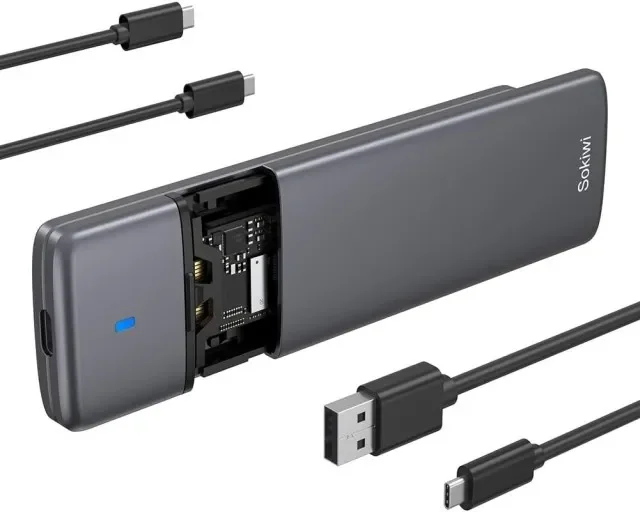
Repurposing an old SSD into an external drive primarily requires an "enclosure."
Repurposing Internal SSDs into External Drives
When a computer is upgraded, particularly with a new SSD, the previous internal drive is often left without a use. Instead of discarding these drives, a straightforward method exists to convert them into external storage. This process involves placing the internal SSD into a specific external enclosure, allowing it to connect to computers and other devices via USB.
What is Needed: The SSD Enclosure
The core component for this transformation is an SSD enclosure. These devices act as a housing for the internal SSD and provide a connector (typically USB) to interface with external devices.
Read More: Chrome mimeHandler API lets extensions handle file types
SATA SSDs: Require a 2.5-inch SATA to USB enclosure.
NVMe SSDs: Require an M.2 NVMe to USB enclosure. Some enclosures are designed to support both NVMe and SATA M.2 drives, or even both 2.5-inch SATA and M.2 NVMe/SATA drives.
Enclosure Cost: These enclosures are generally described as affordable, with prices often cited around $10 for basic models.
Practical Applications for Converted SSDs
Once converted, an old SSD functions much like a standard external hard drive or flash drive, but with the inherent speed advantages of SSD technology.
Data Transfer: They can be used to easily move files between different computers or devices.
Backup Storage: An old SSD can serve as a dedicated drive for backing up important files.
Gaming: Even older SATA SSDs are capable of running games smoothly, offering a way to expand game libraries or store frequently played titles.
Media Streaming: The speed of an SSD makes it suitable for streaming media files.
Network Attached Storage (NAS): For users with multiple old SSDs, consolidating them into an SSD-only NAS is a possibility, although this may require more complex setup.
Understanding Drive Types and Enclosures
It is important to correctly identify the type of old SSD to ensure the correct enclosure is purchased.
| Drive Type | Required Enclosure Type | Connection Standard |
|---|---|---|
| 2.5-inch SATA SSD | 2.5-inch SATA to USB Enclosure | USB 3.0 or higher |
| M.2 SATA SSD | M.2 SATA to USB Enclosure | USB-C or USB-A |
| M.2 NVMe SSD | M.2 NVMe to USB Enclosure | USB-C or USB-A |
| M.2 NVMe/SATA SSD | M.2 NVMe & SATA to USB Enclosure | USB-C or USB-A |
Some modern enclosures, like docking stations, may include M.2 slots for SSDs, offering a more integrated solution if a docking station is also needed.
The performance of the final external drive will depend on both the SSD itself and the USB interface speed of the enclosure and the host computer.
Expert Analysis
The consensus from available information is that repurposing old SSDs is a practical and economical solution.
"SABRENT external SATA SSD and HDD enclosure is an affordable, no-frills way to give your SATA SSD a second lease on life." - HowToGeek
"Portable SSD enclosures are generally affordable." - SlashGear
"External hard drive enclosures are quite inexpensive these days." - Rick's Daily Tips
The speed of SATA SSDs is considered sufficient for many tasks, including operating system responsiveness and game performance.
The primary benefit cited is extending the lifespan of functional hardware, reducing electronic waste.
Conclusion
The evidence strongly indicates that old internal SSDs, whether SATA or NVMe, retain significant utility. By acquiring an appropriate and affordable USB enclosure, these drives can be transformed into functional external storage devices. This method offers a cost-effective way to increase portable storage capacity, create dedicated backup solutions, and reduce electronic waste. The simplicity of the process makes it accessible for most computer users.
Sources
HowToGeek: Don't throw away your old SATA SSD: Turn it into an external drive for $10 (Published: 24 minutes ago) - https://www.howtogeek.com/dont-throw-away-your-sata-ssd-its-still-very-useful/
XDA Developers: 5 clever ways to repurpose an old SSD instead of throwing it away (Published: Jan 25, 2026) - https://www.xda-developers.com/5-clever-ways-to-repurpose-an-old-ssd-instead-of-throwing-it-away/
PCWorld: Build your own external high-speed SSD (Published: Oct 21, 2024) - https://www.pcworld.com/article/2490494/diy-external-ssd-continue-using-old-internal-ssds.html
SlashGear: You Can Turn Your Old SSD Into A Portable Drive - Here's How (Published: Jun 23, 2025) - https://www.slashgear.com/1890363/turn-old-ssd-into-external-drive/
Rick's Daily Tips: How to convert a bare hard drive or SSD into an external USB drive (Published: Jul 18, 2025) - https://www.ricksdailytips.com/turn-internal-hard-drive-into-an-external-drive/
Partition Wizard: How to Use SSD as External Storage? A Step-by-Step Guide (Published: Nov 6, 2025) - https://www.partitionwizard.com/clone-disk/how-to-use-ssd-as-external-storage.html
LaptopDecision: Reuse Your Old SSD as Portable Storage (Published: Oct 1, 2024) - https://laptopdecision.com/blog/Reuse-Your-Old-SSD-as-Portable-Storage
HowToGeek: Don't throw away your old SSD—do this with it instead (Published: Dec 9, 2025) - https://www.howtogeek.com/dont-throw-away-your-old-ssd-how-you-can-repurpose-it/