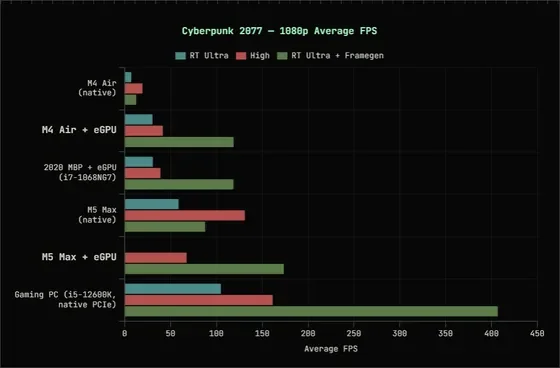
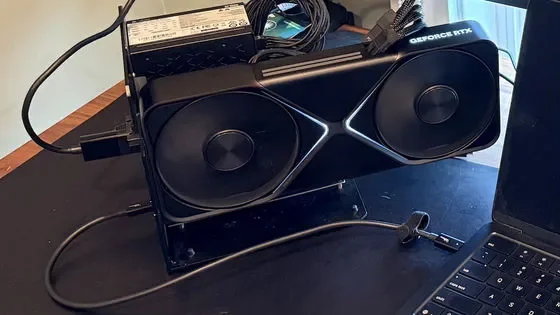
Engineers have successfully interfaced an NVIDIA RTX 5090 desktop graphics card with M4-based MacBook Air and M5 Max-based MacBook Pro units. This achievement bypasses traditional macOS limitations using custom kernel extensions and emulation layers. While the hardware communicates with the system, performance remains highly variable depending on the software stack and translation requirements.
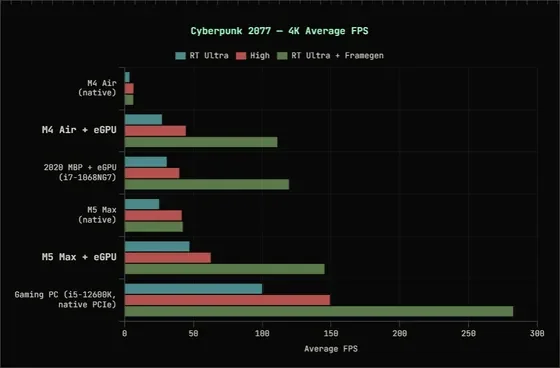
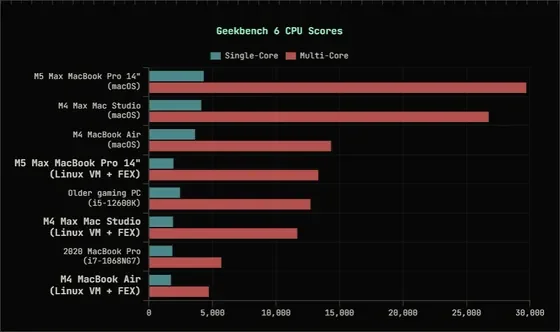
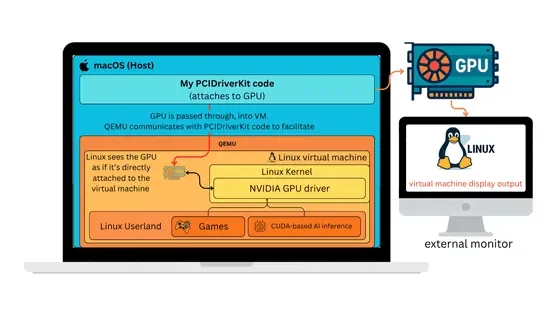
The primary barrier to gaming on Apple silicon is the lack of native driver support; performance currently relies on FEX-Emu (x86-to-ARM translation) and Linux virtual machine environments.
| System Setup | Target Resolution | Performance (Base) | Performance (w/ Frame Gen) |
|---|---|---|---|
| M4 MacBook Air | 1080p RT Ultra | 7 FPS | 13 FPS |
| M5 Max MacBook Pro | 4K RT Ultra | 47 FPS | 145 FPS |
| Native PCIe PC | 4K RT Ultra | ~90 FPS | N/A |
Technical Hurdles and Solutions
To facilitate this connection, developers addressed significant architectural conflicts between Apple’s proprietary silicon and desktop-grade hardware:
PCI BAR Mapping: Bypassed kernel panics during initialization.
DART IOMMU: Worked around the 1.5GB mapping limit using custom virtual DMA devices in QEMU.
Driver Alignment: Addressed proprietary NVIDIA behavior using kprobes to patch interaction layers.
Instruction Translation: Used FEX-Emu to bridge x86-64 gaming binaries to ARM64 architecture, though this introduces a severe performance penalty compared to native environments.
The 'TinyGPU' Alternative
Separately, the firm Tiny Corp has released an open-source macOS kernel extension dubbed TinyGPU. Unlike the eGPU gaming experiments which prioritize graphical rendering, this project focuses on compute-heavy tasks for AI inference.
Read More: Chrome mimeHandler API lets extensions handle file types
Compatibility: Supports NVIDIA and AMD hardware through the Tiny Grad compiler.
Inference vs. Rendering: While successful in executing Llama 3.1 models, the setup is approximately ten times slower than Apple’s own Metal API for inference tasks.
Official Stance: Although the project required specific Apple entitlements, the driver has gained approval for operation, marking a departure from the company's historical restriction of non-integrated GPU compute.
Contextual Perspective
For years, the intersection of Apple Silicon and NVIDIA hardware has been defined by a total absence of interoperability. The recent emergence of eGPU setups on MacBooks signifies a shift in hobbyist engineering, yet these configurations remain largely experimental. Users face persistent stability issues, including DMA mapping constraints that prevent the execution of many modern titles.
Despite the technical novelty, current benchmarks demonstrate that the M5 Max setup is roughly half as efficient as a native PCIe-connected system, largely due to the overhead imposed by translation layers. The experiment highlights the friction between modular desktop components and highly integrated mobile architecture.