Google Messages, the default texting application for Android devices, is introducing a substantial shift in its "Smart Reply" functionality, allowing users to preview and modify AI-generated responses before they are sent. This new "Tap to Draft" option, currently available in beta versions of the app, alters the behavior of suggested replies from immediate dispatch to insertion into the message composition field. The update addresses a persistent user complaint regarding accidental sending of ill-fitting or inappropriate AI-generated text.
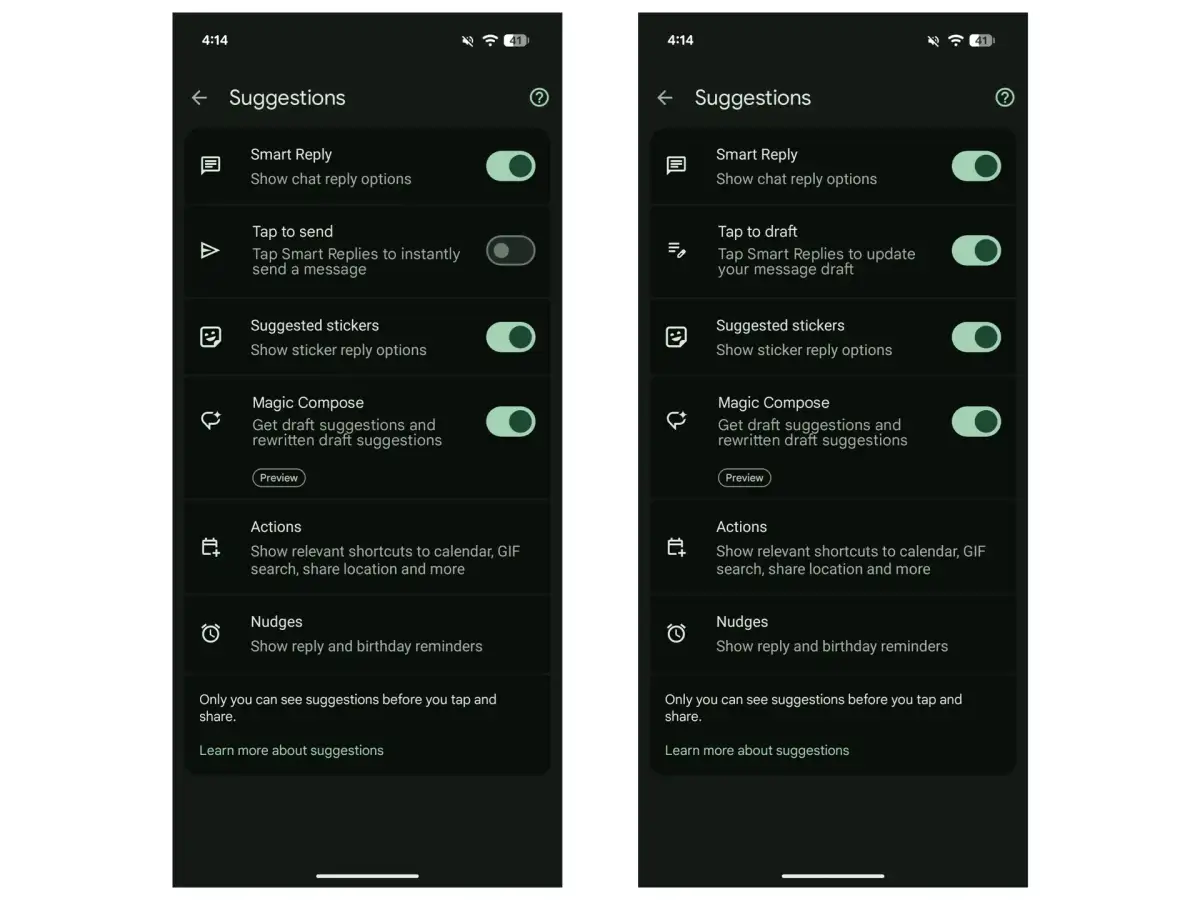
The change, observed in beta version 20260303 of Google Messages, means that instead of a single tap sending a suggested reply outright, the same tap will now place the chosen suggestion into the text box, awaiting user confirmation or alteration. This adds a crucial intermediary step, offering a "second step to avoid accidental sends," as one report noted. Users can locate this new preference within the app's settings, specifically under "Suggestions," situated just below the existing "Smart Reply" toggle.
Read More: Chrome mimeHandler API lets extensions handle file types
Control Over Conversational Flow
This adjustment signifies a move towards greater user agency in automated communication features. Previously, tapping a Smart Reply meant instant transmission, a convenience that often led to user error and the need for subsequent apologies or corrections. The "Tap to Draft" mechanism, however, provides a window for review, enabling users to either edit the AI's suggestion to better fit their intent or discard it entirely.
"Google Messages is introducing a much-needed tweak to its Smart Replies feature that should reduce the chances of users accidentally sending the wrong AI-generated response."
This feature has been observed on devices like the Google Pixel 10a, indicating a progressive rollout to select users and testers. The development suggests a response to user feedback and a broader trend of refining AI integrations to be more collaborative and less presumptive in user-facing applications.
Background: The Evolution of Smart Replies
Smart Replies in Google Messages have long offered quick, contextually relevant responses to incoming messages. These AI-powered suggestions, appearing above the compose box, were designed for speed and efficiency. However, their immediate dispatch mechanism, while swift, lacked a critical safeguard against user oversight or misinterpretation of the AI's contextual understanding.
Read More: YouTube App comment deletion glitch affects Android users
Earlier beta versions had already hinted at this modification, with reports from January of this year also noting a "Tap to Edit" option for Smart Replies in beta build v2026011301RC00. This latest iteration, "Tap to Draft," solidifies the change and integrates it more seamlessly into the user experience. The move is seen as a significant quality-of-life improvement, aligning the application's automated features with a more deliberate and controlled user interaction model.