

Recent updates to Google's photo editing application, Snapseed, have introduced a new in-app camera feature for iPhone users. This update allows users to not only edit photos but also to capture them directly within the app, incorporating manual controls and real-time retro film emulations. The addition marks a significant evolution for Snapseed, transforming it from a purely post-processing tool into a more comprehensive mobile photography platform. This new functionality is available in version 3.15.0 of the app on the Apple App Store.
Background and Scope of the Update
Snapseed, a free and popular photo editing application developed by Google, has long been a favored tool for photo enthusiasts due to its robust features and lack of subscription requirements. Historically, users would capture images using their device's native camera app and then import them into Snapseed for editing.
Read More: Chrome mimeHandler API lets extensions handle file types
The recent update introduces several key enhancements for iPhone users:
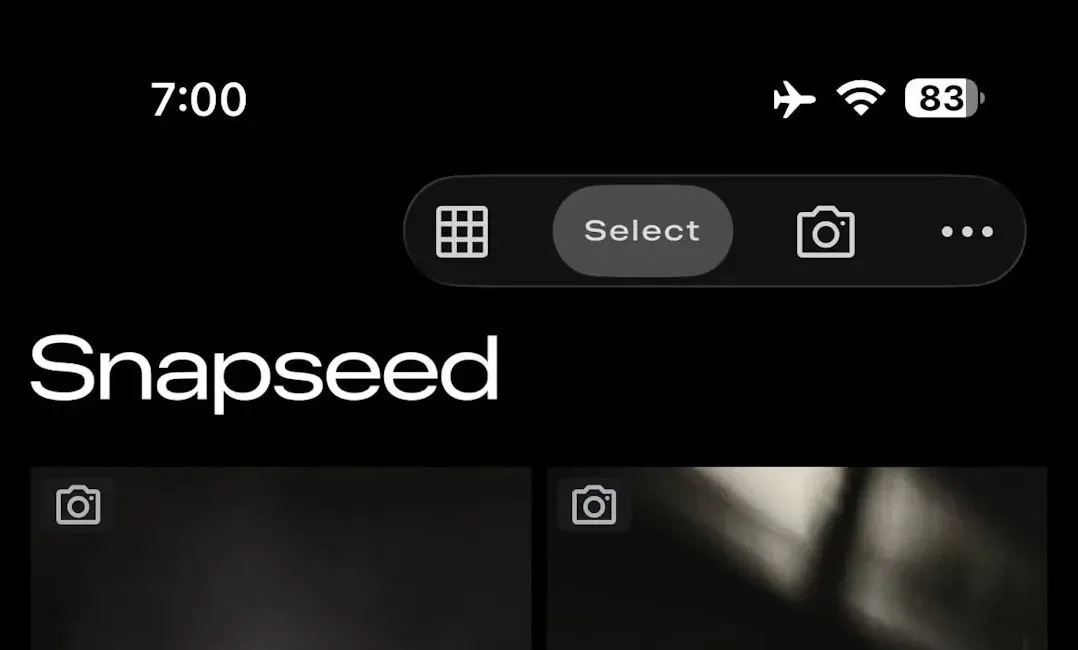
Integrated Camera Functionality: A new camera icon has been added to the top-right corner of the Snapseed app, providing direct access to an in-app camera. This streamlines the workflow by allowing users to shoot and edit within a single application.
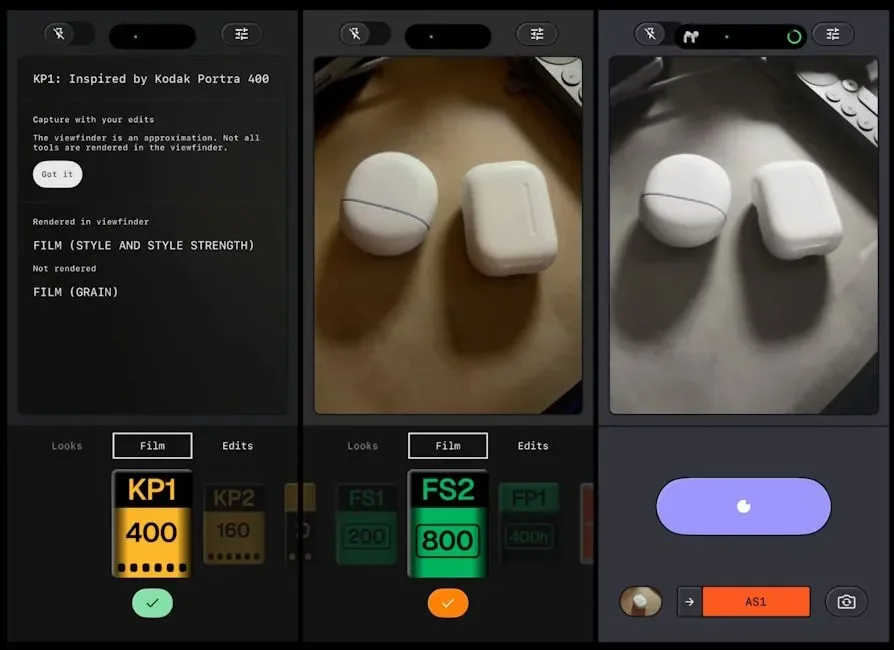
Manual Controls: The new camera feature includes advanced manual settings, such as ISO, shutter speed, and focus. This provides users with greater control over their photography, akin to professional camera operations. A skeuomorphic dial is present to allow for smooth transitions between automatic and manual modes.
Retro Film Emulations: The update offers real-time emulation of various classic film styles, adding a distinct aesthetic to captured images. Users can also apply custom saved looks directly within the camera interface.
Editable Stack: Each photograph captured with the new camera includes a full editing stack, allowing for further non-destructive adjustments within Snapseed.
The update for iOS was soft-launched in December, initially with limited access via widgets and shortcuts. The current rollout, version 3.15.0, provides full integration within the app itself.
User Experience and Control
The introduction of manual controls and retro film styles aims to enhance the creative possibilities for iPhone photographers.
Manual Control Integration
Direct Access: The camera function is now accessible directly from the main app interface, replacing previous methods of access such as Lock Screen widgets or Control Centre.
Granular Adjustments: Users can adjust settings like ISO, shutter speed, and focus, offering a level of control typically found in dedicated camera hardware. This moves Snapseed beyond simple filter application.
Mode Switching: A tactile, skeuomorphic dial is provided, facilitating a more immersive experience when switching between automatic and manual shooting modes.
Retro Aesthetic Options
Real-time Emulation: The app now provides real-time previews of 11 different vintage film-style emulations. This allows users to visualize the final look of their photos before capture.
Customizable Looks: Users have the ability to apply their own saved editing styles directly through the camera interface, further personalizing the shooting process.
Platform Disparities
The release of these advanced camera features exclusively for iPhone has drawn attention and reaction from the Android user base.
iOS Focus: The new camera functionality and manual controls have been rolled out for Snapseed on iOS.
Android Absence: There has been no corresponding update to bring similar camera features to the Android version of Snapseed. This has led to expressions of disappointment and confusion among Android users, with some perceiving it as a slight compared to their iOS counterparts. This situation has caused some to feel that the update for iPhone users is "a slap in the face for Android users."
Expert and User Sentiment
Initial reporting suggests a positive reception among iPhone users looking for enhanced photographic capabilities within a free application.
"Snapseed 3.15.0, now available on the Apple App Store, adds a proper in-app camera to the iPhone version, complete with manual ISO, shutter speed and focus controls." - Stuff.tv
"Google has rolled out a new in-app camera option for Snapseed on iPhone, expanding the app beyond photo editing." - Business Standard
The move is seen by some as an expansion of Snapseed's capabilities, transforming it into a more complete mobile photography solution. The free nature of the app, combined with these advanced features, makes it a notable offering in the mobile photography space, especially when compared to paid alternatives or less feature-rich native camera apps.
Read More: YouTube App comment deletion glitch affects Android users
Conclusion and Implications
The recent update to Snapseed for iPhone introduces significant functionality by integrating a full-featured camera with manual controls and retro film emulations. This update transforms the app into a more comprehensive tool for mobile photographers, offering enhanced creative control directly within the capture process.
The decision to release these features exclusively for the iOS version has, however, created a noticeable disparity, leading to user dissatisfaction among the Android community. This platform-specific release raises questions about future development priorities for Snapseed across different operating systems. The long-term implications may involve a divergence in features and user experience between the iOS and Android versions of the application.
Sources
Stuff.tv: https://www.stuff.tv/news/snapseed-iphone-camera/ - Provides an overview of the new camera features and manual controls in Snapseed for iPhone.
9to5Google: https://9to5google.com/2026/02/18/snapseed-camera-iphone/ - Details the official rollout of the Snapseed camera for iPhone, highlighting manual controls and retro film options.
Business Standard: https://www.business-standard.com/technology/tech-news/snapseed-brings-in-app-camera-with-pro-controls-to-iphone-what-s-new-1260219005291.html - Reports on the addition of a new in-app camera with "PRO" manual controls and real-time retro film styles to Snapseed on iPhone.
The Verge: https://www.theverge.com/tech/881260/snapseed-ios-camera-manual-controls-film-filters - Covers Google's addition of a camera function to Snapseed on iOS, including manual controls and film filters.
Beebom Gadgets: https://gadgets.beebom.com/news/google-snapseed-camera-update-for-ios - Discusses the latest Snapseed camera update for iOS, emphasizing pro manual controls and retro film support.
TechTimes: https://www.techtimes.com/articles/314722/20260219/snapseed-ios-gets-powerful-pro-camera-manual-controls-real-time-film-emulation.htm - Reports on Snapseed for iOS receiving a pro camera update with manual controls and real-time film emulation.
Phandroid: https://phandroid.com/2026/02/19/the-snapseed-camera-iphone-users-have-been-waiting-for-is-officially-here/ - Announces the official release of the Snapseed camera for iPhone, allowing direct photo capture.
TechRadar: https://www.techradar.com/phones/iphone/android-fans-left-baffled-as-google-launches-new-snapseed-camera-for-iphone - Highlights the dissatisfaction among Android fans regarding the new Snapseed camera mode being exclusive to iPhone.





