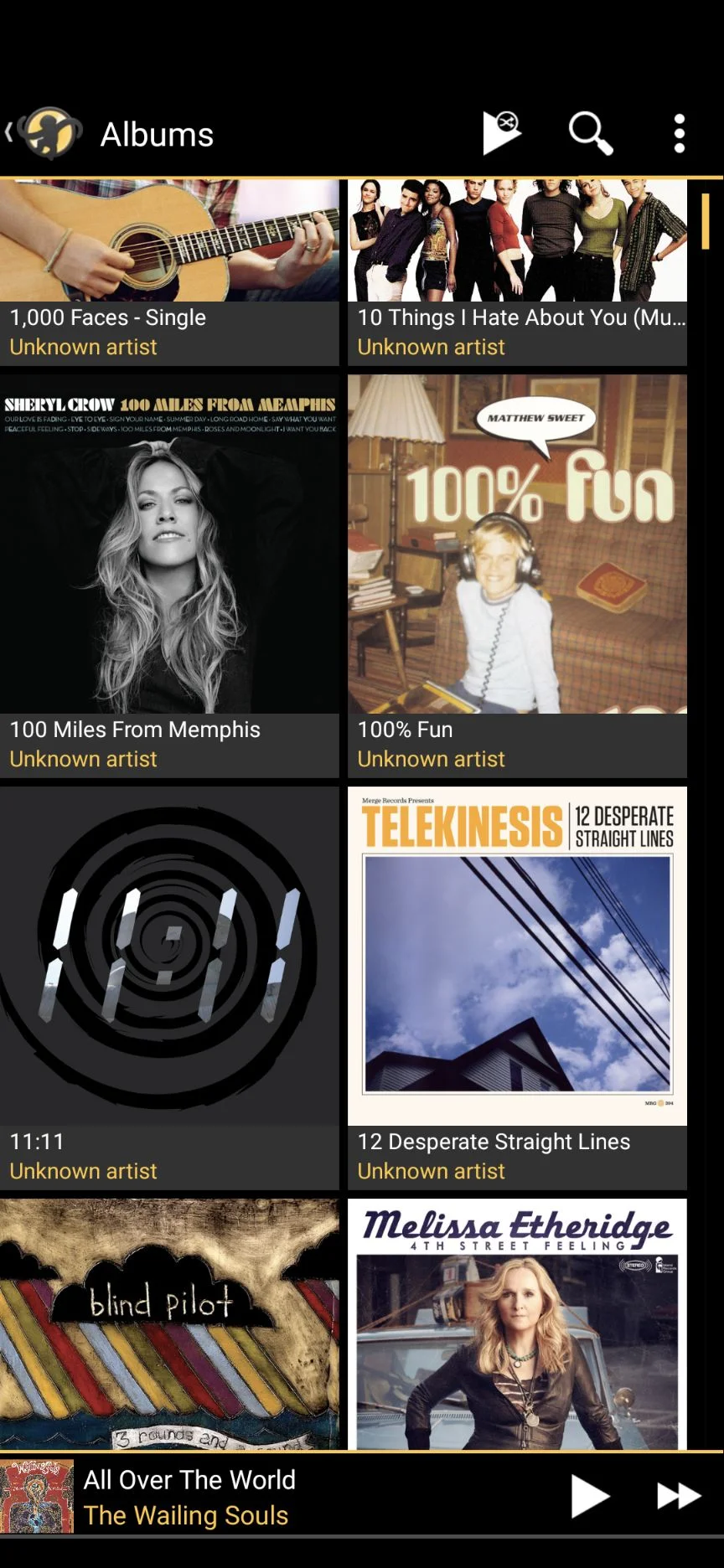
A persistent issue where music files are cataloged under "Unknown Artist" is causing considerable frustration for users across various operating systems and music management applications. This problem affects the display of artist, album, and track information, hindering users' ability to organize and access their digital music collections. The root cause remains unclear, with evidence pointing to potential software bugs and discrepancies in how different applications interpret audio file metadata.
The Challenge of Digital Music Organization
Users are encountering a common problem: their meticulously organized music libraries are inexplicably displaying large portions of their collection as "Unknown Artist." This issue is not confined to a single software or device, suggesting a widespread and complex challenge in digital audio management.
Many users report that while the music file itself contains correct artist and album data, the application used to manage or play the music fails to recognize it.
This leads to albums and individual tracks appearing under a generic "Unknown Artist" heading, making them difficult to find and manage.
The problem arises after various actions, including syncing music to devices, updating software, or simply attempting to access existing libraries.
Evidence of Widespread Discrepancy
Reports detailing the "Unknown Artist" issue span multiple years and touch upon different operating systems and popular music software. This extensive documentation highlights the recurring nature of the problem.
Read More: AI Tools Help Search Epstein Files and Create Viral Videos
MediaMonkey Forum: A user in 2024 noted a discrepancy between how "Artist" and "Album Artist" fields are handled, suggesting a potential fundamental issue in metadata interpretation within the application. The operating system might recognize the field, but it remains blank.
TechGuy.org: In 2023, a user with a new Android phone and SD card experienced music files ripping correctly on their Windows 10 laptop but appearing as "Unknown Artist/Album" after syncing. Despite weeks of troubleshooting, the issue persisted.
Apple Community: As far back as 2015, users reported that albums displayed as "Unknown Artist" in the Music app, though the correct artist would appear when the song was played. Changes to the artist name did not resolve the display issue.
Apple Community (again): In 2018, a user reported that iTunes lost artist, album, and genre information for approximately 12,000 songs, primarily sourced from ripped CDs. This occurred after an iTunes update, with WAV files being particularly affected.
Microsoft Q&A: In 2021, a user with a deep understanding of MP3 file structure and ID3v2 tags asserted that their files were correctly formatted. They insisted that the issue stemmed from bugs within Windows Media Player, rather than corrupted files.
Disparities in Metadata Handling
The core of the "Unknown Artist" problem appears to lie in how different software applications read and display the metadata embedded within audio files. While the underlying data may be present and correct, the interpretation varies significantly.
Application-Specific Interpretation
Windows Media Player (WMP) vs. File Contents: Users report that WMP sometimes fails to recognize metadata that is demonstrably present and correct within the MP3 files. This suggests potential bugs or design choices within WMP that lead to these omissions.
iTunes and Apple Music App Behavior: In Apple's ecosystem, albums may show as "Unknown Artist" in the Music app while appearing correctly in iTunes. This indicates an inconsistency within Apple's own software or a difference in how they process metadata for different applications.
"Artist" vs. "Album Artist" Fields: Media players often use both an "Artist" field for individual tracks and an "Album Artist" field for the entire album. If these fields are not populated consistently or if the software prioritizes one over the other in an unexpected way, it can lead to display errors.
Impact of File Formats and Updates
Certain file formats and software updates have been implicated in exacerbating the "Unknown Artist" issue.

WAV Files: One user reported a significant loss of metadata for WAV files after an iTunes update. This format, unlike MP3s, is not inherently tagged with ID3 metadata in the same way, and its handling can be less standardized across applications.
Software Updates: Several reports link the sudden appearance of "Unknown Artist" entries to software updates for applications like iTunes. This suggests that updates may introduce bugs or alter how existing metadata is read.
User Troubleshooting and Perceived Solutions
Frustrated users have engaged in extensive troubleshooting, often with limited success. Their efforts highlight the elusive nature of the problem.
Manual Tag Editing: Users have attempted to manually edit artist and album information within their music players or with dedicated tagging software. While this sometimes resolves the issue for individual files, it is often a tedious process for large libraries.
Re-ripping and Re-syncing: Some users resort to re-ripping CDs or re-syncing their music libraries, hoping to force a correct re-application of metadata. This is time-consuming and does not guarantee a solution.
Seeking Community Help: Forums and support communities are rife with requests for assistance, indicating that standard troubleshooting steps are often insufficient.
Expert Insights and Technical Considerations
Technical discussions point towards the complexity of audio metadata standards and the challenges of their implementation.
"The ID3 tag specifications, particularly for MP3 files, allow for a great deal of flexibility. However, this flexibility can also be a source of incompatibility. Different software may prioritize or interpret certain tag fields differently, leading to a mismatch in how the information is presented."
— Anonymous Software Developer, specializing in media playback
The inconsistency across platforms suggests that the issue is not necessarily with the source files themselves but with the applications that process them.
"When users are certain their files contain the correct metadata, as evidenced by using other tools, the fault often lies within the specific media player or operating system's file handling. Bugs in how these applications parse and display tags are a frequent culprit."
— Technical Forum Moderator, specializing in audio software
Conclusion and Lingering Questions
The "Unknown Artist" phenomenon represents a significant and widespread annoyance for music enthusiasts. The evidence gathered indicates that this is not an isolated incident but a recurring problem stemming from the complex interplay between audio file metadata and the software used to manage it.
Read More: Shakira India Tour 2026: Mumbai April 10, Delhi April 15 Concert Tickets Go On Sale March 1
Software Bugs: The most consistent thread across reports points to bugs or limitations within music management applications and operating systems.
Metadata Interpretation: Discrepancies in how "Artist" and "Album Artist" fields are read and displayed by different programs are a key factor.
Impact of Updates: Software updates have been observed to trigger or worsen the issue in some cases.
Further investigation is warranted to identify specific software versions and configurations that are most susceptible to this problem. Without a definitive resolution from software developers, users are left to navigate this persistent glitch through often frustrating manual workarounds.
Sources:
MediaMonkey Forum: https://www.mediamonkey.com/forum/viewtopic.php?t=97997
Context: User discussion on the handling of "Album Artist" vs. "Artist" fields in MediaMonkey and Windows.
TechGuy.org: https://www.techguy.org/threads/music-syncing-as-unknown-artist-album.1235845/
Context: User experiencing music syncing issues to an Android device, resulting in "Unknown Artist" tags.
Apple Community: https://discussions.apple.com/thread/7165487
Context: User reporting "Unknown Artist" display for albums in Apple's Music app, despite correct information present.
Apple Community: https://discussions.apple.com/thread/8475573
Context: User reporting loss of artist, album, and genre info for WAV files in iTunes after an update.
Microsoft Q&A: https://learn.microsoft.com/en-gb/answers/questions/2712165/half-my-music-library-shows-up-as-unknown-artist
Context: User claiming MP3 files have correct metadata but Windows Media Player shows them as "Unknown Artist."


:max_bytes(150000):strip_icc():focal(965x164:967x166)/taylor-swift-guitar-030524-ff087bd9e32242009126525c1db23b96.jpg)