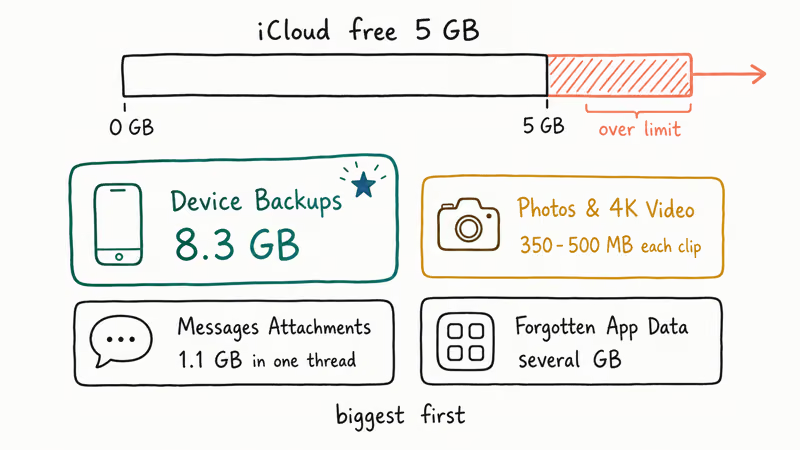
The perennial digital dilemma of a full iCloud storage account is resurfacing with renewed urgency, prompting a wave of users to seek quick remedies. The core issue revolves around the finite space allocated to users, which is rapidly consumed by a variety of data, most notably photos and videos, alongside app data and device backups.
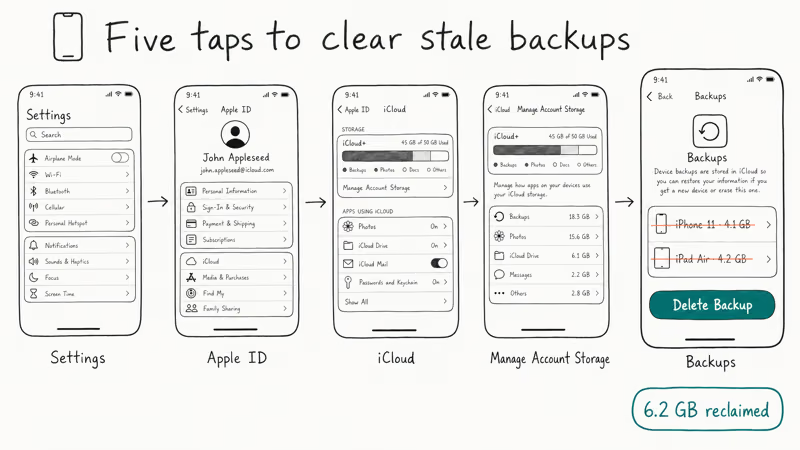
Key to resolving the recurring "iCloud storage full" alerts lies in actively managing and purging accumulated digital detritus. Several sources point to a direct pathway within device settings to survey this digital hoard: navigating to Settings, tapping one's name (Apple ID), and then selecting 'iCloud' followed by 'Manage Account Storage' or simply 'Storage'. This central hub reportedly reveals a breakdown of which applications and data types are consuming the most space, offering a starting point for decluttering.

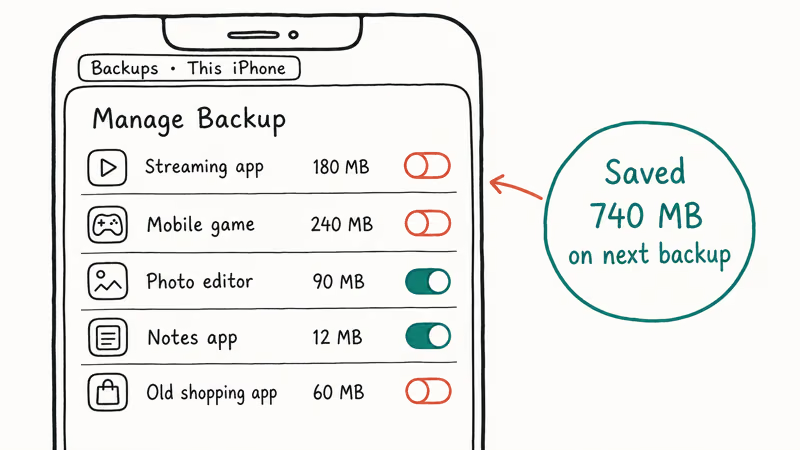
A common culprit identified is the 'Photos' application, with features like 'Optimize iPhone Storage' suggested as a way to retain lower-resolution versions on the device while keeping full-resolution images in the cloud. However, this presumes the cloud itself has space. More drastic measures involve disabling iCloud synchronization for applications that are not frequently used, a step that can liberate significant gigabytes with minimal user interaction.
Read More: Chrome mimeHandler API lets extensions handle file types
The process of clearing out the "Recently Deleted" album for photos is also highlighted as crucial, as these items continue to occupy storage space until permanently removed. For those facing persistent issues or seeking immediate relief, several articles suggest direct deletion of specific app data or even entire backups from iCloud.
Navigating the Digital Landscape
The problem isn't unique to individual devices; reports indicate similar struggles across iPhones and iPads. Some users even report their iCloud storage appearing full despite seemingly ample free space, a situation attributed to potential syncing glitches or delays in the system's reporting of actual storage status. These discrepancies can be particularly confusing when a device indicates free space while iCloud itself signals a capacity breach.
Underlying Mechanics
It appears that the exponential growth of digital content, particularly visual media from devices, consistently outpaces the default storage allocations provided by services like iCloud. This creates a cyclical pattern where users find themselves repeatedly addressing the same storage limitations.
While many quick fixes focus on deletion and optimization, the underlying tension remains between the desire to preserve digital memories and the practical constraints of cloud storage. The disparity between physical iPhone storage and iCloud storage is also a point of clarification for some users, distinguishing between the device's internal capacity and the remote cloud-based repository.
Read More: iOS 27 to Feature New Siri in Dynamic Island