Google's managed Kubernetes service, GKE, is reportedly beefing up its capabilities for AI and machine learning workloads. Recent experiments and documentation highlight the integration of NVIDIA's B200 GPUs with GKE's managed DRANET and the GKE Inference Gateway. This push aims to tackle the growing networking demands of large AI models and streamline their deployment and serving.
The core of these advancements seems to center on improving the performance and ease of use for deploying and serving complex AI models, particularly large language models (LLMs). Key components enabling this include:
Managed DRANET (Dynamic Resource Allocation Networking): This feature is designed to intelligently allocate high-performance network interfaces alongside accelerators like GPUs on Kubernetes. It shifts from a generic approach to a more "topology-aware" resource management, directly addressing performance bottlenecks that emerge as AI/ML models grow in complexity and size. This is particularly crucial for distributed AI/ML tasks where network bandwidth is a critical factor.
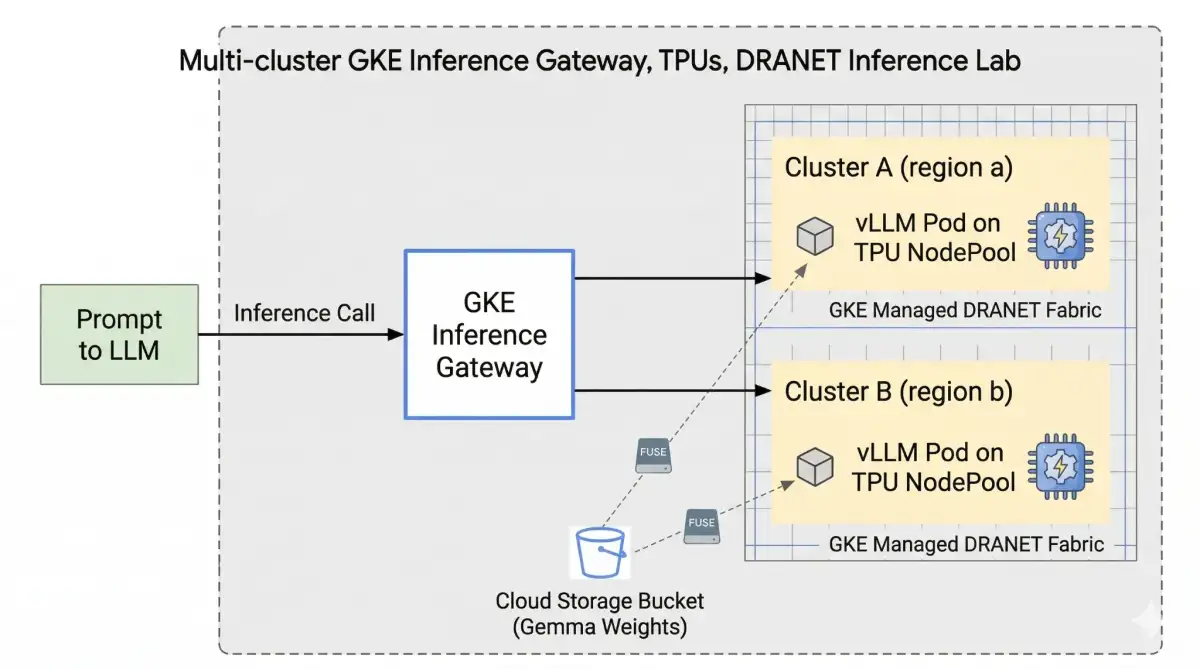
GKE Inference Gateway: This component acts as a sophisticated load balancer and traffic manager, specifically tailored for AI inference. It offers "gen-AI-aware" scaling and load balancing techniques, enhancing the routing of client requests to AI models. Recent developments also point to a preview of multi-cluster GKE Inference Gateway, extending these capabilities across multiple GKE clusters, even in different regions, to improve scalability and resilience.
NVIDIA B200 GPUs and A4X Max instances: The integration with these powerful hardware accelerators, like the A4X Max instances supporting 8 B200 GPUs, provides the computational muscle needed for demanding AI model training and inference.
Streamlining Deployment and Serving
The practical application of these technologies involves a series of steps within GKE. For instance, deploying a model like Deepseek on a GKE cluster with A4 nodes involves:

Configuring the cluster to utilize specific GPU nodes, often via
nodeSelectorsettings that reference accelerator network profiles likegke.networks.io/accelerator-network-profile: auto.Utilizing Custom Resource Definitions (CRDs) such as
InferenceObjective,InferencePool,Gateway, andHTTPRouteto define and manage the inference workload.Setting up internal load balancing using regional internal Application Load Balancers, specified with types like
gke-l7-rilb.Creating
resourceClaimsto attach defined networking resources.Deploying models and services, which may involve pulling models from sources like Hugging Face (requiring tokens).
For private clusters, careful consideration is given to ensuring nodes have necessary access, especially when downloading models during startup.
Recent efforts have also focused on enabling multi-cluster deployments for AI inference. This involves configuring resources like Gateway, HTTPRoute, HealthCheckPolicy, and GCPBackendPolicy across different regions and clusters. The use of tools like Terraform and kubectl is evident in automating the deployment of these complex, multi-cluster setups.
Read More: Chrome mimeHandler API lets extensions handle file types

Broader Ecosystem Integration and Support
Beyond DRANET and the Inference Gateway, GKE's AI/ML story includes other integrations:
Vertex AI: Google Cloud's platform for AI model development and deployment, including Vertex AI Training and Model Garden, is being deepened with NVIDIA's offerings. This includes Vertex AI Training with NVIDIA NeMo integration and featuring NVIDIA Nemotron models.
Cloud Storage FUSE: This allows GKE pods to mount Google Cloud Storage buckets as local file systems, facilitating access to model weights and data.
TPU Support: Enhancements to GKE's TPU serving stack aim to leverage the price-performance benefits of Tensor Processing Units for AI inference.
GKE Autopilot: This managed GKE offering is also seeing updates to provide GPU compatibility and improved performance for AI/ML workloads, alongside cost reductions.
These developments signal a sustained effort by Google Cloud to provide a robust, scalable, and cost-effective platform for deploying and serving AI and ML models, from experimentation to large-scale production.