Google has recently updated its Chrome browser with several new features aimed at improving user productivity. These updates include a "Split View" mode for easier multitasking, built-in tools for editing and annotating PDF files, and a direct "Save to Google Drive" option for downloaded files. The company states these changes are designed to streamline workflows and reduce the need for switching between applications.
New Tools for Enhanced Browser Use
The recent rollout of new features to Google Chrome for desktop users signals a focus on improving how people manage tasks and documents directly within the browser. These additions are designed to make common actions more efficient and accessible.
Split View: This feature allows users to view two browser tabs simultaneously within a single window. This is intended to reduce the constant need to switch between different windows, aiding tasks such as watching a video while taking notes or comparing information from two web pages.
PDF Annotation: Chrome now includes a built-in PDF viewer with editing capabilities. Users can directly mark up PDF documents, highlight text, and add notes without needing to download the file and open it in separate software.
Save to Google Drive: A new option allows users to save downloaded PDF files directly to their Google Drive account. This aims to simplify file management and prevent downloaded files from getting lost on a local computer.
The core of these updates revolves around enhancing user efficiency by integrating functionalities traditionally requiring external applications directly into the Chrome browser.

Timeline and Availability
The announcement of these features occurred on Thursday, with reports indicating they are rolling out to desktop users. Some sources suggest these features are becoming widely available as of Chrome version 145. While the rollout is described as gradual, the intention is to make them accessible to a broad user base.
Read More: AI Tool D-ID Replaces Human Voice, Causes Confusion
How the Features Work
Split View for Multitasking
The Split View functionality is designed to help users manage multiple tasks by presenting two tabs side-by-side.
A dedicated split view icon within Chrome allows users to activate this mode.
This feature supports use cases like having a video conference on one side and a document on the other, or referencing a coding guide while working on a project.
Direct PDF Editing and Annotation
Chrome's integrated PDF viewer has been enhanced with annotation tools.
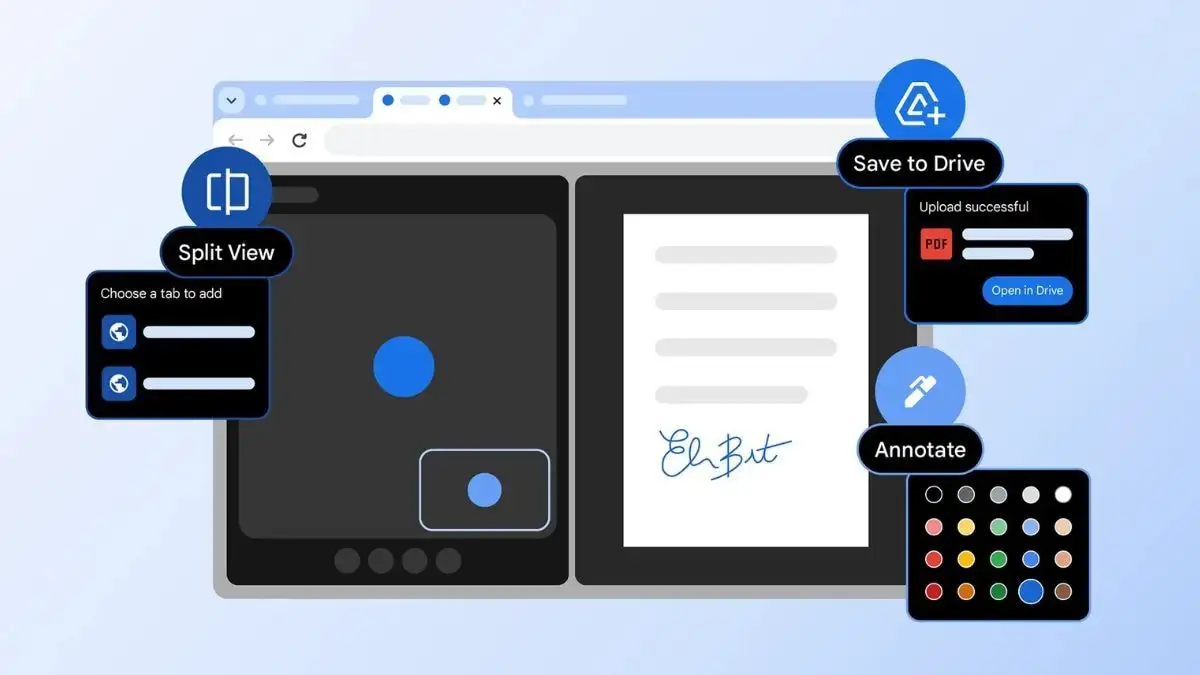
Users can now highlight text directly within PDF documents.
The ability to add notes and comments to PDFs is also included.
This removes the need to download and open PDFs in separate applications for minor edits or review.
Seamless Google Drive Integration
The "Save to Google Drive" option aims to simplify the process of storing and accessing downloaded files.
Instead of saving a PDF to a local folder on a computer, users can opt to save it directly to their Google Drive.
This feature is accessible from the top bar of Chrome’s PDF Viewer.
The goal is to prevent files from being misplaced and to ensure they are readily available across devices via Google Drive.
The integration of these features directly addresses common user pain points related to tab management, document handling, and file organization.
Potential Use Cases and Benefits
The new features are presented as tools to improve both professional and everyday use of the Chrome browser.

Students: Can use Split View to watch lecture videos while taking notes or annotate reading materials directly within Chrome.
Professionals: May find Split View useful for meetings and collaborative work, while PDF annotation can streamline document review processes.
Everyday Users: Can benefit from simpler file management by saving important documents directly to Google Drive, and multitasking with Split View for browsing and entertainment.
Context and Competitive Landscape
These updates arrive at a time of increased competition in the browser market, with a growing focus on AI-powered features from both established companies and newer startups. While these specific Chrome enhancements are not AI-driven, they represent Google's efforts to bolster the core functionality of its browser.
Read More: Google Chrome lets users change New Tab page look from 15 August 2024
Google has previously integrated its Gemini AI assistant into Chrome.
The introduction of these productivity tools can be seen as a strategy to retain and attract users by enhancing the browser's utility for common tasks.
The company emphasizes that these features are beneficial for both individual users and enterprise customers.
The strategic introduction of these productivity features suggests a continued effort by Google to solidify Chrome's position in a rapidly evolving browser landscape.
Expert Analysis
While specific expert commentary directly quoting individuals was not extensively detailed in the provided summaries, the overall sentiment from the reporting is that these are significant practical upgrades. The articles consistently frame these additions as enhancements to core user workflows.

One report notes these features arrive "amid growing competition from AI-focused browser start-ups," suggesting Google is shoring up fundamental usability while also pursuing AI.
Another points out the focus on "reducing tab switching, making document edits easier and simplifying file management," indicating a clear strategic intent behind the feature set.
The consensus among reporting outlets is that these are beneficial additions designed to make Chrome a more self-sufficient and efficient tool for daily digital tasks.
Conclusion and Implications
Google Chrome's latest update introduces a trio of features – Split View, PDF annotations, and Save to Google Drive – that collectively aim to boost user productivity. By integrating these functionalities directly into the browser, Google seeks to simplify multitasking, streamline document handling, and improve file management.
Read More: OpenAI legal dispute with Elon Musk on 22 May 2026 delays IPO plans
The Split View feature offers a direct solution for users who juggle multiple tabs and applications.
The enhanced PDF viewer reduces the reliance on external software for basic document interactions like highlighting and note-taking.
The Save to Google Drive option addresses the common issue of managing downloaded files, making them more accessible and organized.
These updates indicate a continued commitment by Google to refine the core user experience of its flagship browser, even as the broader market sees increased focus on AI capabilities. The success of these features will likely be measured by their adoption and impact on how users manage their daily digital activities within Chrome.
Sources Used:
indianexpress.com: Published 33 minutes ago. Details Split View for multitasking, built-in PDF editing for signing and note-taking, and Save to Google Drive for downloads.🔗 https://indianexpress.com/article/technology/tech-news-technology/google-chrome-split-view-save-to-drive-pdf-highlight-10542258/
9to5google.com: Published 15 hours ago. Announces Split View, PDF annotation, and Save to Google Drive as new desktop productivity features, with availability noted around Chrome 145.🔗 https://9to5google.com/2026/02/19/chrome-split-view-pdf/
macrumors.com: Published 9 hours ago. Reports on Chrome getting Split View for multitasking and PDF Annotations, along with a Save to Google Drive option.🔗 https://www.macrumors.com/2026/02/19/chrome-split-view-pdf-annotations/
gadgets360.com: Published 1 hour ago. Covers new productivity features including Split View, built-in PDF markup tools, and Save to Google Drive, rolling out gradually to desktop users.🔗 https://www.gadgets360.com/apps/news/google-chrome-update-split-view-built-in-pdf-markup-tools-and-more-features-11111524
blog.google: Published 1 day ago. Officially announces three new Chrome features: Split View, PDF annotations (highlighting text, adding notes), and Save to Google Drive for PDFs.🔗 https://blog.google/products-and-platforms/products/chrome/chrome-productivity-improvements/
business-standard.com: Published 2 hours ago. Highlights Google Chrome's rollout of Split View, PDF annotations, and Save to Google Drive to simplify tab switching, edits, and file management.🔗 https://www.business-standard.com/technology/tech-news/google-users-split-screen-edit-pdfs-directly-inside-chrome-on-web-1260220003421.html
newsbytesapp.com: Published 4 hours ago. Details Google's update to Chrome, including Split View for side-by-side browsing, native PDF annotation tools, and a Save to Google Drive option, amid competition from AI start-ups.🔗 https://www.newsbytesapp.com/news/science/google-upgrades-chrome-with-split-view-and-built-in-pdf-editing/story
chromeunboxed.com: Published 11 hours ago. Reports on Chrome's latest update bringing native Split View and PDF annotations to desktop, alongside a more seamless Save to Google Drive integration.🔗 https://chromeunboxed.com/chromes-latest-update-brings-native-split-view-and-pdf-annotations-to-the-desktop/
techcrunch.com: Published 14 hours ago. Announces the official launch of Split View, PDF annotations, and Save to Google Drive features in Chrome, aiming to integrate it more deeply with Google services.🔗 https://techcrunch.com/2026/02/19/as-browser-wars-heat-up-chrome-adds-new-productivity-features/