A significant number of Amazon users have expressed a desire to remove advertisements from their Kindle e-readers and Fire tablets. While Amazon previously offered devices with ad support at a lower price, thereby including advertisements on lock screens and as screensavers, current reports suggest a shift. It appears that customers can now request the removal of these ads at no additional cost, a process that was previously associated with a higher purchase price or a fee for removal.
Background and Initial Offering
Amazon has historically offered devices like the Kindle and Fire tablets with "ad-supported" versions. These devices were sold at a reduced cost, with the understanding that users would see advertisements, often referred to as "Special Offers," on their lock screens or as screensavers when the device was inactive.

Lower Purchase Price: Customers could opt for a cheaper device by accepting the presence of ads.
Ad Placement: These ads typically appeared on the lock screen when the device was powered on but not in use, or as screensavers.
Prevalence: This model has been in place for some time, affecting a broad range of Kindle and Fire tablet owners.
Evolving Ad Removal Policy
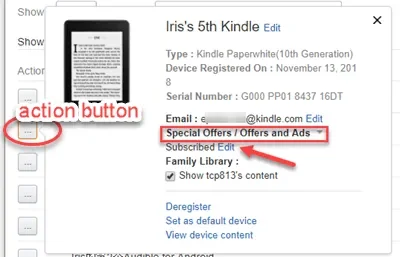
Recent information indicates that Amazon is now providing a method for customers to remove these ads from their devices without incurring extra charges, provided they initiate the request. This contrasts with earlier practices where removing ads might have involved paying an additional fee or accepting a higher initial device cost.
Read More: Chrome mimeHandler API lets extensions handle file types
Direct Request to Support: The primary method described involves contacting Amazon customer support directly.
No Additional Cost: Reports suggest this service is now being offered for free to existing users.
Previous Cost Implications: Historically, purchasing an ad-free version or removing ads might have led to a higher device price.
Methods for Ad Removal
While direct contact with Amazon support appears to be the most straightforward and commonly cited method for free ad removal, other technical approaches have also been documented, some of which may require more advanced user intervention.
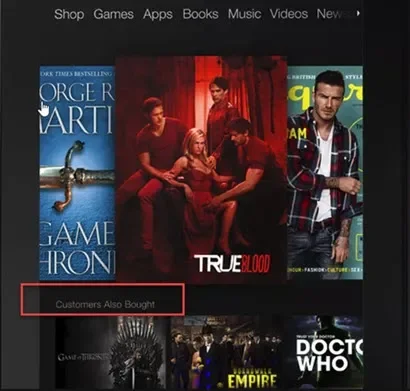
Contacting Amazon Support
This method is presented as the simplest and most accessible for most users.
Process: Users are advised to reach out to Amazon customer service.
Reasoning: While a specific reason for ad removal is not strictly required, some sources suggest mentioning inconvenience or inappropriate content if necessary.
Outcome: Amazon support can reportedly remove ads from the device with a simple action on their end.
Technical Workarounds
For users comfortable with more technical solutions, methods involving device settings or external tools have been proposed.
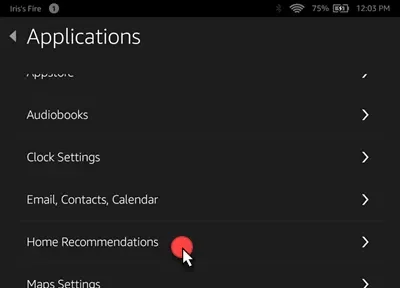
Fire Tablet Settings:
Navigating through device settings, such as "App & Notifications" > "Amazon App Settings" > "Home Screens" to turn off "Recommendations."
Another path involves "Settings" > "Display" and customizing the background wallpaper.
ADB (Android Debug Bridge) Method:
This approach, described as not requiring root access, involves using ADB tools to manage lock screen ads on Fire tablets.
It necessitates enabling USB debugging on the device and executing specific commands.
Rooting:
Some older methods or specific device models might have required rooting the device to remove ads, a process that gives users deeper control but can also void warranties or introduce instability.
User Experience and Customization After Ad Removal
Once ads are removed, users can often customize their device's display settings further.
Lock Screen Options: Instead of ads, users may be able to display book covers or custom screensaver images.
Settings Access: The option to manage lock screen displays is typically found within the device's "Settings" menu, often under "Screen & Brightness" or "Device Options."
Evidence and Documentation
Information regarding the free removal of ads has emerged across various technology and user guide publications.
| Source | Publication Date | Key Information |
|---|---|---|
| AdBlock Tester | October 8, 2025 | How to remove ads from Kindle and Fire devices, including free options. |
| PCWorld | August 18, 2021 | Discusses initial ad-supported pricing and the process of removing ads. |
| The Ebook Reader Blog | March 22, 2024 | Highlights contacting Amazon support as a free method to remove Kindle ads. |
| xda-developers | April 28, 2018 | Details using ADB for ad removal on Fire tablets without rooting. |
| Lifewire | June 14, 2022 | Outlines steps to remove ads on Fire tablets via settings and Amazon profile. |
| wikiHow | October 30, 2022 | Describes methods for removing ads, sometimes noting rooting requirements. |
| Everyday Reading | November 5, 2024 | Recommends contacting Amazon customer service as an easy way to remove ads. |
| An Exercise in Frugality | January 19, 2017 | Mentions a simple process for removing lock screen ads on Fire tablets. |
| Alphr | July 12, 2021 | Covers getting rid of ads on the Amazon Fire Tablet through settings. |
Expert Analysis and User Sentiment
Reports suggest a widespread user desire to opt-out of advertisements on personal devices. The shift towards offering free ad removal indicates Amazon's response to this sentiment, potentially balancing user experience with its advertising revenue models. While specific motivations from Amazon are not detailed, the availability of this free option points to a customer-centric adjustment.
Read More: TCL QM8L TV Features 6000 Nits Brightness and SQD Tech in April 2026
User Preference: Many users prefer an ad-free experience on their personal e-readers and tablets.
Amazon's Strategy: Offering a free removal option may be a strategic move to improve customer satisfaction without a significant loss of ad revenue if only a portion of users opt for it.
Conclusion and Implications
The primary finding is that Amazon now appears to permit customers to request the removal of ads from their Kindle and Fire tablets at no charge. This is a notable change from past practices where such options might have incurred additional costs.
Actionable Information: Users experiencing unwanted advertisements on these devices can contact Amazon support to request their removal.
Future Considerations: It remains to be seen if this policy is permanent or if Amazon will continue to offer ad-supported devices at a lower price point in the future, with the option for free removal being a standard customer service offering.
Sources Used
AdBlock Tester: How to Remove Ads from Kindle and Fire Devices for Free. Published October 8, 2025.
PCWorld: How to remove ads and Special Offers from your Kindle or Kindle Fire. Published August 18, 2021.
The Ebook Reader Blog: Quick Tip: How to Remove Kindle Ads for Free. Published March 22, 2024.
Link: https://blog.the-ebook-reader.com/2024/03/22/quick-tip-how-to-remove-kindle-ads-for-free/
xda-developers: Remove Amazon Lockscreen Ads w/ ADB & Automate (No Root Required!). Published April 28, 2018.
Link: https://xdaforums.com/t/remove-amazon-lockscreen-ads-w-adb-automate-no-root-required.3784848/
Lifewire: How to Remove Ads on an Amazon Fire Tablet. Published June 14, 2022.
Link: https://www.lifewire.com/remove-ads-amazon-fire-tablet-5272166
wikiHow: How to Remove Ads from Kindle Fire HD (with Pictures). Published October 30, 2022.
Link: https://www.wikihow.com/Remove-Ads-from-Kindle-Fire-HD
Everyday Reading: How to Remove Ads from Kindle Readers. Published November 5, 2024.
An Exercise in Frugality: How to Remove Ads From Your Fire Tablet. Published January 19, 2017.
Link: https://anexerciseinfrugality.com/remove-ads-fire-tablet/
Alphr: How to Get Rid of Ads on the Amazon Fire Tablet. Published July 12, 2021.