


Is your smart home behaving like a haunted house? For users of Home Assistant, a powerful open-source platform for home automation, this isn't just a spooky metaphor. It's a persistent, frustrating reality: "ghost devices" are appearing, disrupting automations, cluttering interfaces, and making troubleshooting a nightmare. These phantom entities, invisible yet stubbornly present, represent a growing concern for a community dedicated to precise control over their digital abodes.
What exactly are these ghost devices, and why are they so difficult to exorcise? Are users accidentally inviting them in, or is there a systemic issue within Home Assistant's complex architecture? This investigation aims to untangle the spectral threads plaguing Home Assistant, drawing on user reports, developer discussions, and technical realities to expose the root causes and potential solutions.
The Phantom Menace: When Devices Refuse to Die
The core of the "ghost device" problem lies in Home Assistant's robust registry systems – specifically, the device registry and entity registry. When a device is added, Home Assistant records its identity, its associated entities (like switches, sensors, lights), and their relationships. The issue arises when a device is removed from the physical world or its configuration is drastically altered, yet remnants of its digital presence persist within Home Assistant's records.
Read More: Chrome mimeHandler API lets extensions handle file types
This leaves users with a bewildering experience:
Entities that no longer exist: A light might be physically removed, but its entity (e.g.,
light.living_room_lamp) remains in Home Assistant, appearing "unavailable" or even actively causing errors in automations.Stuck configurations: As seen in the community post from July 26, 2022 (Article 1), a user struggled with ESP8266 devices. Even after deleting files and flashing new code, "ghosts" of previous configurations would resurface, with old "subtitles" or entire device configurations stubbornly refusing to be overwritten or removed. This suggests a disconnect between the physical re-flashing and the persistent state within Home Assistant.
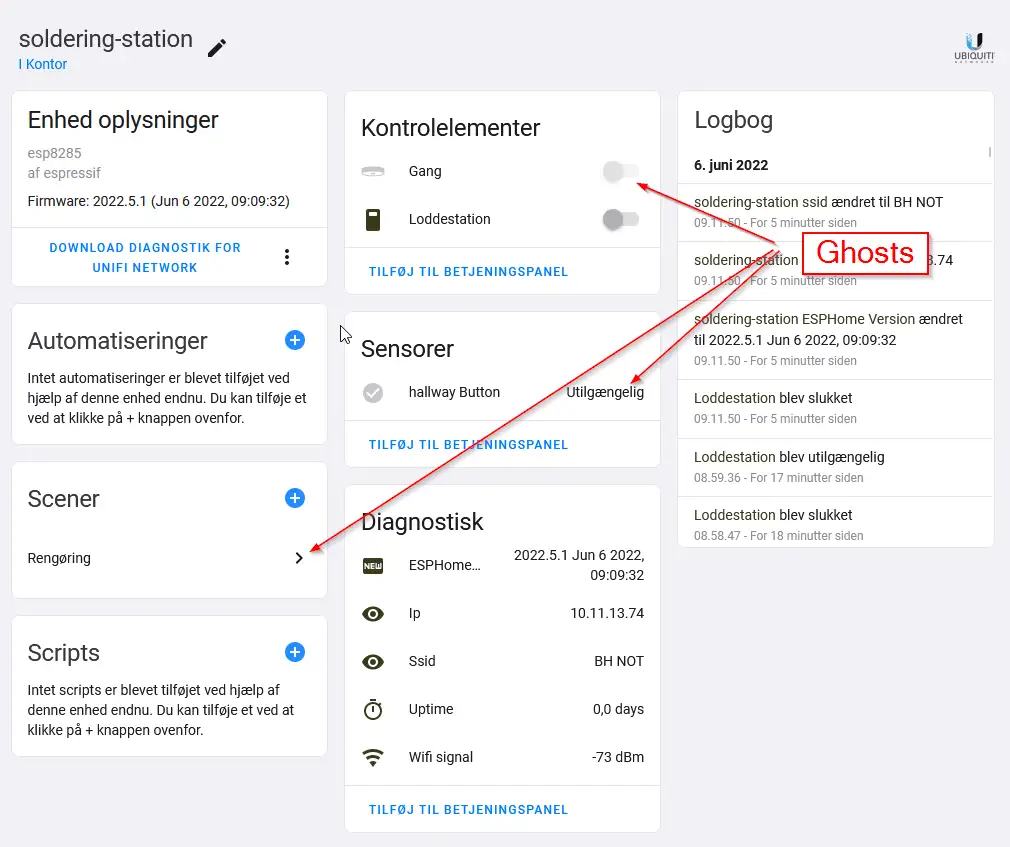
Repurposed devices causing chaos: In a June 6, 2022, community discussion (Article 3), a user reported that after repurposing a device (previously controlling a ceiling light, now a soldering station), "old entities" from its prior life began appearing. Despite attempts to edit
core.entity_registryand removing/re-adding the device, these phantom entities would reappear after a reboot.
The frustration is palpable. Users aren't just dealing with minor glitches; they're fighting digital apparitions that actively undermine the reliability and usability of their smart homes. Why is it so hard to simply tell Home Assistant, "This device is gone," and have it reliably forget?
Tracing the Digital Footprints: A History of Hauntings
The "ghost device" phenomenon isn't new, nor is it confined to a single integration or device type. It's a recurring issue that has surfaced across various smart home protocols and hardware platforms integrated with Home Assistant.
Read More: BEREC Asks for Mobile Network API Ideas from Developers
Early Days and Manual Intervention: In the earlier stages of Home Assistant, managing devices was more manual. When a device was removed or changed, users often had to delve into configuration files, specifically
core.device_registryandcore.entity_registry, to manually purge these entries. This was tedious and prone to error, as accidentally deleting the wrong entry could cause further problems.The Rise of Helper Tools: Recognizing the need for a more streamlined approach, community members developed tools. The Home Assistant Cleanup Tool (Article 2), found on GitHub, exemplifies this. This Python script allows users to target specific
DEVICEIDs – those long hexadecimal strings visible in the Home Assistant URL when viewing a device – and attempt to remove them from the registry files. This tool highlights a crucial point: Home Assistant stores device and entity information in.storagedirectory files, and direct manipulation is sometimes necessary when the user interface fails.Protocol-Specific Specters: The nature of the "ghost" can also vary depending on the underlying technology.
Z-Wave and Zigbee: In wireless mesh networks like Z-Wave, "ghost nodes" can occur due to failed pairing attempts or devices being removed without a proper "exclude" process. A community post from October 18, 2023 (Article 4) mentions this, advising users to check their Z-Wave details page and remove ghosts before attempting new pairings, implying that a clean slate is essential for successful integration.
Matter and Thread: With the advent of newer protocols like Matter and Thread, new variations of ghost devices have emerged. As reported on July 24, 2025 (Article 5), users found ghost devices appearing within the Matter integration, even after the physical device was removed from the Thread network and other interfaces like Google Home. The key insight here is the concept of the "Matter fabric" – a persistent record maintained by the Matter controller. Devices must be explicitly removed from this fabric, not just from the network, to prevent them from lingering as ghosts in Home Assistant.
This historical overview shows a pattern: as Home Assistant integrates more diverse technologies, the challenges of accurately tracking and managing device lifecycles evolve, often requiring specialized solutions.
Behind the Scenes: The .storage Directory and Its Secrets
At the heart of Home Assistant's device and entity management lies its internal database, primarily managed through JSON files within the .storage directory of the Home Assistant configuration. For those willing to get their hands dirty, understanding these files is key to comprehending and sometimes resolving ghost device issues.
The two most critical files are:
core.device_registry: This file stores information about registered devices, including their unique IDs, names, connections (e.g., which entities belong to them), and configuration entries.core.entity_registry: This file details individual entities (sensors, lights, switches, etc.), linking them back to their respective devices and storing their unique entity IDs, states, and areas.
When a device or entity is removed via the Home Assistant UI, these files are supposed to be updated accordingly. However, various scenarios can lead to these updates failing or leaving orphaned entries:
Incomplete UI Deletion: The user interface might not always trigger a complete removal process, especially in complex scenarios or with custom integrations.
External Deletion: If a device is removed from its cloud service or physically powered off and unconfigured without first being unregistered within Home Assistant, the local registry might not be notified of the permanent change.
Integration Bugs: Bugs within specific integrations can cause them to fail in updating the registries correctly when devices are added or removed.
Database Corruption: Though rare, underlying issues with Home Assistant's data storage could lead to inconsistencies.
The .storage directory is the persistent memory of Home Assistant's devices and entities. When the UI fails to clean house, manual intervention here, or via tools that modify these files, becomes the last resort.
Read More: Confidential Computing Security Flaw Found on 4 April 2026
| File Name | Primary Data Stored | Relevance to Ghost Devices |
|---|---|---|
core.device_registry | Device IDs, names, associations, configurations | Contains entries for devices that should no longer exist. |
core.entity_registry | Entity IDs, states, areas, device associations | Contains entities linked to non-existent devices or entities that should have been removed. |
core.area_registry | Information about assigned areas (rooms) | Less direct, but can hold stale references if areas are mismanaged. |
core.config_entries | Details of integrations and their configurations | If an integration is faulty, it might not properly register/deregister devices/entities. |
Understanding this structure allows for more targeted troubleshooting. For instance, if a user knows a specific device ID (e45b71334133d6e5ae6f9fb5dc9eaa86 from Article 2), they can search for this ID within the core.device_registry file to see if it still exists and identify its associated entities in core.entity_registry.
The Ghost Hunter's Toolkit: Solutions and Strategies
For users grappling with phantom devices, a multi-pronged approach is often necessary. While the Home Assistant team continuously works to improve device management, community-driven solutions and best practices remain vital.
1. The "Standard" Exorcism: UI and Reboots
The first line of defense is always the user interface.
Careful Deletion: Navigate to Settings > Devices & Services. Find the problematic device and use the UI's delete option. Always check if the device itself has a "remove" or "reset" function before or after deleting it from Home Assistant.
Reboot and Re-add: After deleting, a full reboot of the Home Assistant server (not just a restart of the Home Assistant Core) can sometimes clear lingering processes or caches. If the device is physical, it's also often beneficial to power cycle it.
Clear Browser Cache: Sometimes, the issue is purely cosmetic, with the browser showing outdated information. Clearing your browser's cache can resolve this.
2. The "Advanced" Toolkit: Scripting and Direct File Manipulation
When the UI fails, more direct methods are required.
hasscleanup.py(Article 2): This GitHub tool is designed precisely for situations where the UI doesn't suffice. It automates the process of identifying and removing devices from thecore.device_registryandcore.entity_registryfiles. Users are strongly advised to always create backups before running such scripts, as direct file editing carries inherent risks.Dry Run Feature: The script includes a
--dryrunoption, which is invaluable. It shows you what it would delete without actually making changes, allowing you to verify its actions.Identifying Device IDs: The article clearly explains how to find the
DEVICEIDfrom the Home Assistant URL (http://YOUR.HA.IP:8123/config/devices/device/DEVICEID).Manual
.storageEditing: For the technically adept, directly editing thecore.device_registryandcore.entity_registryJSON files in the.storagedirectory is an option. This requires extreme caution.Backup First! Always back up these files before making any edits.
JSON Structure: Understand basic JSON formatting (dictionaries, lists, key-value pairs).
Unique IDs: Pay close attention to
device_idandentity_idto ensure you are deleting the correct entries. Incorrect edits can corrupt your Home Assistant configuration.Restart Required: After manual edits, a Home Assistant restart is mandatory for the changes to take effect.
3. Protocol-Specific Hygiene
Certain protocols demand specific cleanup procedures:
Matter/Thread (Article 5): Devices must be removed from the "Matter fabric." This often involves accessing the Matter controller's web interface or using specific tools associated with the Matter server to explicitly unprovision devices. Simply removing them from Wi-Fi or disabling them isn't enough.
Z-Wave (Article 4): Proper "exclusion" of Z-Wave devices is critical. This is typically done through the Z-Wave controller's interface in Home Assistant, putting it into exclusion mode and then triggering the exclusion command on the device itself.
The most effective approach often involves a combination of understanding the specific integration, utilizing community tools for automation, and, when necessary, performing careful, manual intervention with adequate backups.
Read More: Street Fighter 6 Year 4 Pass adds Tifa and 3 new fighters in 2026
The Specter of Inconsistency: Why Does This Keep Happening?
The persistence of ghost devices, despite repeated user efforts and the existence of cleanup tools, points to deeper systemic issues within Home Assistant's architecture and the broader smart home ecosystem. It raises critical questions for both users and developers:
Is the device lifecycle management robust enough across all integrations? Home Assistant supports a vast array of integrations, each with its own complexities. Are there fundamental design patterns that are being missed, leading to incomplete state management?
How effectively are integrations communicating device state changes to the core registry? When a device is added or removed via an integration (e.g., a cloud service like Tuya, or a local protocol like ESPHome), how reliably is that event propagated to the
core.device_registryandcore.entity_registry?What is the role of external factors like cloud outages or network instability in creating ghost devices? If a device goes offline due to a temporary internet issue, does Home Assistant sometimes incorrectly assume it's permanently gone, or vice versa?
Are the underlying databases or storage mechanisms susceptible to data inconsistencies? While JSON files are human-readable, are there edge cases where Home Assistant might not properly save changes, leading to stale data?
Is there a need for more user-friendly, built-in tools for "deep cleaning" devices directly from the UI, without requiring direct file access? Many users are intimidated by editing
.storagefiles.
The continued prevalence of this issue suggests that while individual fixes exist, a comprehensive, universal solution that prevents ghost devices from appearing in the first place remains elusive. This is not to diminish the efforts of the Home Assistant community and developers, but to highlight the inherent complexity of managing a constantly evolving, interconnected web of smart devices.
The Lingering Presence: What Happens Next?
The "ghost device" problem is more than just an annoyance; it's a symptom of the challenges in creating truly seamless and resilient smart home ecosystems. For users, it means continuing to be vigilant, learning troubleshooting techniques, and relying on community wisdom.
Moving forward, several developments could help:
Enhanced Integration Auditing: The Home Assistant core development team could focus on more rigorously auditing device lifecycle management within key integrations.
Improved UI Feedback: Providing clearer feedback within the UI when a device removal process might be incomplete could alert users to potential issues.
"Garbage Collection" Features: The introduction of more automated "garbage collection" routines within Home Assistant itself, designed to periodically scan for and flag potentially orphaned devices/entities, could be beneficial.
Standardized Device Removal Protocols: As new protocols like Matter mature, their standardization efforts might lead to more robust device unprovisioning, which Home Assistant can then leverage.
Until then, the spectral presence of ghost devices will likely continue to haunt Home Assistant servers. For the dedicated users, the battle against these digital phantoms is a testament to their commitment to taming technology, even when it seems determined to play tricks. The quest for a perfectly clean and responsive smart home is ongoing, and understanding these digital specters is a crucial step in achieving that goal.
Sources:
Article 1: How to delete ghost devices? - https://community.home-assistant.io/t/how-to-delete-ghost-devices/444038
Article 2: GitHub - jamespo/hasscleanup: Home Assistant Cleanup Tool - Remove Devices & Entities - https://github.com/jamespo/hasscleanup
Article 3: Why do I get ghost items in a device that is repurposed? - https://community.home-assistant.io/t/why-do-i-get-ghost-items-in-a-device-that-is-repurposed/428391
Article 4: Ghost Devices - https://community.hubitat.com/t/ghost-devices/126211
Article 5: Thread/matter Ghost devices - https://community.home-assistant.io/t/thread-matter-ghost-devices/913989



